Could it be that WordPress.com is the ultimate thought leadership platform? Possibly! Especially with the addition of Google+ to publicize. Watch this…
My miracle…
I love the power of WordPress.com for bringing people together around beautiful ideas…
Which blogging tool should I use; WordPress.com or tumblr?
The answer is yes! While I normally advise clients, students and readers to “never use two tools were one will do” here is a case here is a case where using both is not only acceptable but desirable. Here’s why:
- WordPress.com is great at Search Engine Optimization [SEO] but it does not allow JavaScript or iframes amongst other things
- Tumblr is not as good at Search Engine Optimization [SEO] but it does allow JavaScript and iframes amongst other things
- For whatever reason — technical or political – tumblr is available as a sharing option where WordPress.com is not so you can pick the best tool for the job
- ‘Curation’ via tumblr’s bookmarklet is a little easier than WordPress.com’s ‘Press This’…
- They can be linked together from a technical perspective in a way that makes them appear to be one website to Google
- They can both be scripted by ifttt.com
- Both have great – but different – fans [which will give you more exposure]
- You can have a unified WordPress/tumblr site for less that $20 per year
…and I’m sure there are some other reasons that I’ve overlooked!
Let me talk you through some of the issues here:
Related articles
- Lean Domain Search Acquired by Automattic for WordPress.com users to easy Domain findings (socialpositives.com)
- How to Choose a Free Platform for Your First Blog (web.appstorm.net)
- WordPress.com Dashboard Gets a Makeover (wpkube.com)
- Small Business Blog Tune Up: Turbo Charge with SEO (blogworld.com)
- Beginning With WordPress: Deciding Between WordPress.com and WordPress.org (wp.tutsplus.com)
- Which blog platform is best for your business? (socialmedia.biz)
- Import from Tumblr in 3 Easy Steps (en.blog.wordpress.com)
- Chrome Users: Try the WordPress.com Extension – WordPress.com (en.blog.wordpress.com)

If you’re looking for helpful tips on managing your WordPress.com blog, look no further than lorelleteaches.com; it’s a fantastic WordPress resource for WordPress.com bloggers…

 In 2005, WordPress became modular separating the design and architecture from the core programming code.
Today, a WordPress Theme contains files called template files that hold the architecture of the site and template tags, code that initiates actions within the site and data from the database. The design is applied through a stylesheet, holding the instructions for the colors, images, and look and feel of the entire site.
This tutorial covers the basics of the structure of a WordPress Theme and standard customization options.
The Structure of a WordPress Site
 Like all websites today, a WordPress site contains a background area, header, sidebar(s), content area, and footer.
The background area is considered the canvas that the site’s structural and design elements rest. It is usually a solid color, pattern, texture, or a design that does not overwhelm the rest of the content and design elements.
The header area…
View original post 3,510 more words
Do you like me?
Being a WordPress consultant in the WordPress.com community is a terrible thing. I’m always coming across things that I’d like to change or add to my blog as I read your content on your sites. Changing the look and feel of my blog is something that I could do even more often than I do, but recently, I changed to the Splendio theme and I’m quite happy with the results. It’s a little bit edgy for me, but I think the generally upbeat ‘feel’ is consistent with my message of wholeheartedness and self-compassion…
What about you? What’s your take?
















Time for a course correction? Updated 12/13/2012
Here’s another post in an infrequent series that I do to give back to the WordPress.com community…
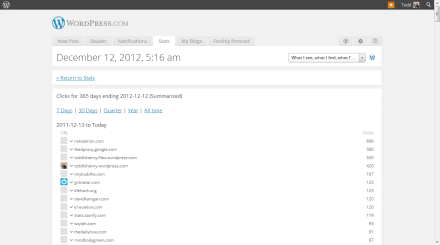
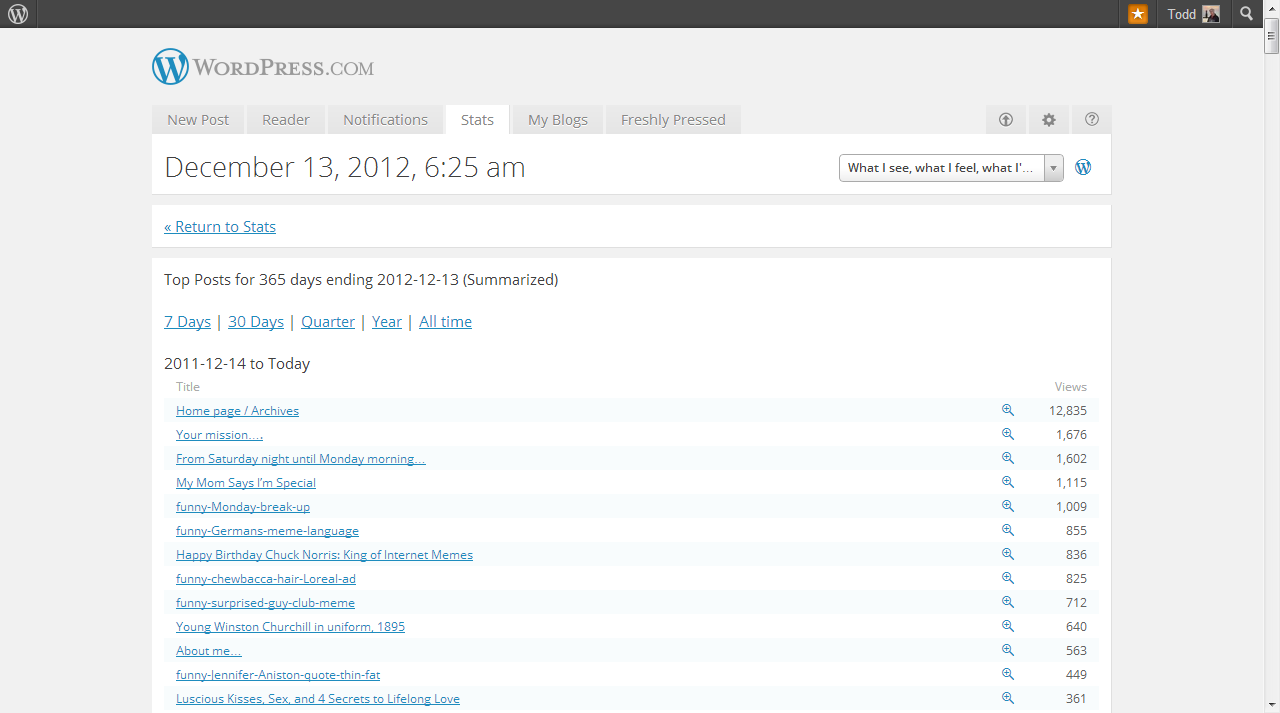
A famous comment usually attributed to Lord Leverhulme goes: “I know that half of my advertising budget is wasted, but I’m not sure which half”. The same is true of your blogging and social media time! How can you tell if you’re on track? Which 50% is working? What can you do if you’re off course? Well, the simplest way may be to check your WordPress.com stats for the past year and see what links people are actually clicking on…

…then give them more of what they like and less of what they don’t! @jonswanson reminded me that reviewing your mosts popular posts and doing more like them is a good review do to as well!
Another interesting way is to add twitter tool Twylah to your mix. Twylah brings your brand message into focus, extends the life of your tweets, and helps you get discovered beyond Twitter. Twitter you say? I don’t even use that! Well, you might want to start! I use the sharing feature in the WordPress settings to send every WordPress post to Twitter as a way of amplifying my posts. I also use Twitter to share articles that I don’t feel like sharing on the blog. Together — my blog posts and my tweets — create what I call a lifestream and Twylah is the place where I put that lifestream. Twylah automagically organizes my lifestream by topic and gives me a pretty good indication of how the internet views my lifestream. If the topics are way off, it might be time for a course correction! If the topics look like who you want to be known as, then Twylah provides that validation as well…

Another reason why I love Twylah in closing is that I can host Twylah on my domain so that I can effectively add Twylah to my WordPress.com blog and get Search Engine Optimization [SEO] benefits from my tweets as well. Oh, and did I mention that Twylah is free?
Blogging in the WordPress.com community is fun, but if you actually want to be recognized as an authority in an area and get found when people are looking for you, these two tools may be all you need to amp your internet presence! Oh, and by the way if you’re looking for WordPress.com or ‘thought leadership’ marketing coaching, you can stop by my business site at http://e1evation.com/services/…
Zemanta for WordPress.com
Posts with images get twice the engagement of those that don’t. This weekend, learn to use Zemanta in WordPress.com…
Full story at: ZEMANTA | Zemanta plugin for WordPress.com.
Something interesting happened this week…

For the first time in my 7 years of blogging, my personal blog [this one] has a higher Alexa ranking and is getting more traffic than my business blog. A couple of datapoints…
- http://toddlohenry.com is hosted at WordPress.com; http://e1evation.com is a hosted WordPress site currently hosted on HostGator
- I use the same blogging workflow — the ‘e1evation workflow‘ — for both sites
- I have posted more frequently to my person blog of late [the grass is greener where you water it?]
You can read more about the different version of WordPress here. My conclusion? WordPress.com is a very powerful and viable platform for ‘thought leadership‘ marketing. Why mess with the hosted version unless you really need a feature that WordPress.com doesn’t offer? WordPress is “good, fast, and cheap”…
Continue reading “Something interesting happened this week…”
I’m a big fan of effective curation for content marketing and ‘thought leadership’. My preferred platform is Windows 7 these days, but many of my clients prefer MacOS. I put together a little riff yesterday outlining how use 3 tools to effectively curate content on the Mac. In this screencast I cover…
Enjoy!
Questions? Feedback?
Related articles
- [Almost] everything I think I know about the mechanics of curation (e1evation.com)
- Two tools I ‘fired’ from my blogging workflow in 2011 (e1evation.com)
- Zemanta Power User: Todd Lohenry, e1evation – Part 2 of 2 (zemanta.com)

If I only had one tool to use for blogging, it wouldn’t be WordPress and it wouldn’t be Blogger [although both are great tools that I use every day] it would be Posterous. I’m currently scripting my own screencast on the subject of Posterous, but in the meantime, here are a couple of other good Posterous videos to whet your appetite…
httpv://www.youtube.com/watch?v=7oluAciipZU
httpv://www.youtube.com/watch?v=qxeFOD5lZ4k
httpv://www.youtube.com/watch?v=b6iYxbcGqNo

In the past few weeks, I’ve had numerous conversations with colleagues, partners and in some cases, clients, about blogging and the challenges of keeping a blog up and running.
Most of those conversations come down to one thing: Content.
Do you have enough to say to sustain a blog? Do you have strong enough opinions and takes to cut through the massive sea of clutter that is the open Web these days? And, maybe most importantly, do you know what to look for when it comes to content your customers or audience might be interested in?
That last one is the key point I want to focus on today. So many brands, when they start blogging, think too myopically about blogging. I need to talk about my product or service. I need to talk about my company. I need to talk about what my product or service can do for my customers.
Sure, that’s part of the mix, but in my view, it’s actually a pretty small part.
The much larger portion of your blog’s content should focus on everything AROUND your product or service.
via arikhanson.com
It never ceases to amaze me that many of my client buys the logic of purchasing a blog enabled website but falter when it comes to actually producing content. After all, what is a blog post but an email to the world about who we are, what we do, why we do it and the ‘world’ in which we do it? You can follow the ‘via’ link above to get ideas for thinking like a blogger. Comment or ‘connect’ to discuss how this applies to you and your organization…

With job satisfaction rates at record lows and more and more people looking to enjoy a higher quality of life, millions of people are desperately trying to leave their miserable jobs and are flocking to the world of blogging and Internet marketing.If you’re already a blogger, chances are you’ve heard of Darren Rowse, Brian Clark, and Leo Babauta. These names are synonymous with blogging success and the dream of living the “Internet lifestyle”.
On the surface, blogging as a business seems like a dream job. You get to set your own hours, work from anywhere with little more than a laptop, connect with fascinating people from all over the world, and potentially have an impact on the entire world.
Now THAT’S a job!
The TruthDon’t get me wrong, blogging does offer all these things and more and beats the hell out of sitting in a cubicle working for the man every day of the week.
Given how many people are drawn to this lifestyle, the competition to stand out and become noticed is enormous. Millions of blogs are started each day and cover every conceivable topic imaginable.
What often begins as the thought of a life working on your iPad while sitting on a sandy beach, slowly transforms into the harsh reality of what goes into building a successful and profitable business from your blog.
Before you embark on a journey to quit your job and become the next pro blogger, you need to fully understand what goes into creating a sustainable business.
This article, while primarily written for those who can to build a sustainable business on blogging has some ‘truths’ that you need to consider. You can follow the ‘via’ link above to go to the source if you want to drill down on the 10 hard truths. Business blogging to promote your existing business is an altogether different topic — comment below or ‘connect’ above so we can talk about how this applies to your business…
Related articles
- How to Optimize Your WordPress.com Blog for iPad (lockergnome.com)
- Home bases and outposts… (e1evation.com)
- Is anyone reading your blog? (jfeskorn.com)
 Bright, shiny objects!
comments