Decluttering your mental clutter

Minimalist Mac OS X Desktop

Good stuff from Ryan Nicodemus at The Minimalists

Those voices inside your head won’t be quiet. All you can hear is your boss telling you to have those reports done by Friday or your daughter reminding you that there’s soccer practice this Saturday or a parent’s voice telling you that they’re going to need you to help them drop off their car at the mechanic’s.

Most of us have somewhere to be each day, not to mention the everyday fire drills we get put through at work or at home. It can feel very overwhelming, and our minds can get noisy. Some of us even have echoes of voices from experiences of many years ago.

How do you deal with all of that internal mental clutter?

Mental clutter is something I’ve worked on my entire life. I used to feel like, no matter what, I constantly had some sort of mental clutter—I always had something going on in my mind. If it wasn’t something new causing that anxious cluttered feeling, it was something from the past creeping back into the present to haunt me. Some days were worse than others, but it was there every day.

And then, after fixing several other parts of my life, I was able to cut down on the mental clutter…

Source: The Minimalists | Decluttering Your Mental Clutter

Go to the source if you want to know more about the parts Ryan fixed. Me? I am a huge fan of David Allen and his “Getting Things Done” principles and I use a tool called Evernote to get things out of my head and into a foolproof system where I will never lose them. You can read my take on these ideas over at my business blog…

Related articles from http://e1evation.com

Want to experience peace of mind? Blogger David Kanigan and I both advocate learning Getting Things Done [GTD] principles and tools to help accomplish that objective. Follow the ‘reblogged’ link to read his post…

Live & Learn's avatarLive & Learn

From David Allen, author of Getting Things Done, Productive Living, March 2012:

“If you want to have the feeling of freedom regularly, you’ve got to get used to it. Literally.

What’s the greatest obstacle to living in the relaxed state of mind that is possible with the methods I coach? People simply aren’t used to it. Anything your nervous system experiences as unique or unusual will likely be “rejected” unconsciously in short order, because it is not in the comfort zone.

People are more comfortable being uncomfortable than being comfortable, if they have been uncomfortable for an extended period of time. It’s simply an ingrained pattern, and familiarity is more comfortable than novelty. Most people have for so long experienced the gnawing sense of anxiety about all the un-captured and un-clarified “work” of their life, that’s what they’re used to. Then, no matter how clean and in control they…

View original post 224 more words

7 Little Things That Make Life Effortless

Pelican cleaning itself
Image via Wikipedia
Leo Babauta writes this morning…

1. Do less. This is my productivity mantra, and it’s counterintuitive. I actually don’t believe in productivity, but instead believe in doing the important things. Do less, and you’ll force yourself to choose between what’s just busywork, and what really matters. Life then becomes effortless, as you accomplish big things while being less busy.

2. Having less is lighter. Start asking yourself if you really need everything you have, or if you just have it out of fear. Start to let go of what you have, so it doesn’t own you. And then, as you have less, you feel lighter. It’s wonderful.

3. Let the little things go. People who struggle often fight over little things. We obsess over things that don’t really matter. We create resistance instead of letting things glide off us. Let the little things go, breathe, and move on to the important things.

4. Clean as you go. I haven’t written about this for a long time, but early in the life of Zen Habits I wrote about the habit of cleaning as you go. Instead of letting the cleaning pile up, put things away when you’re done. Wash your bowl. Wipe the counters clean as you pass them. Sweep up dirt when you notice it. By cleaning a little bit at a time, as you make messes, cleaning up becomes a breeze, and it’s never difficult. By the way, this applies to everything in life, not just cleaning.

5. Make small, gradual changes. Most people are too impatient to follow this advice — they want to do everything at once. We have so many changes to make, but we don’t want to wait a year for it all to happen. As a result, we often fail, and then feel crappy about it. Or we don’t start at all, because so many big changes is intimidating and overwhelming. I’ve learned the hard way that small changes are incredibly powerful, and they last longer. Gradual change leads to huge change, but slowly, and in a way that sticks. And it’s effortless.

6. Learn to focus on the things that matter. This is implied in the items above, but it’s so important I have to emphasize it. Swimming (or any physical activity for that matter) is best done when you do only the motions that matter, and eliminate the extraneous motions. Stop thrashing, start becoming more efficient and fluid. You do this by learning what matters, and cutting out the wasted activity.

7. Be compassionate. This makes dealing with others much more effortless. It also makes you feel better about yourself. People like you more, and you improve the lives of others. Make every dealing with another human being one where you practice compassion.

Follow the ‘via’ link above for the rest of his thoughts on the topic…

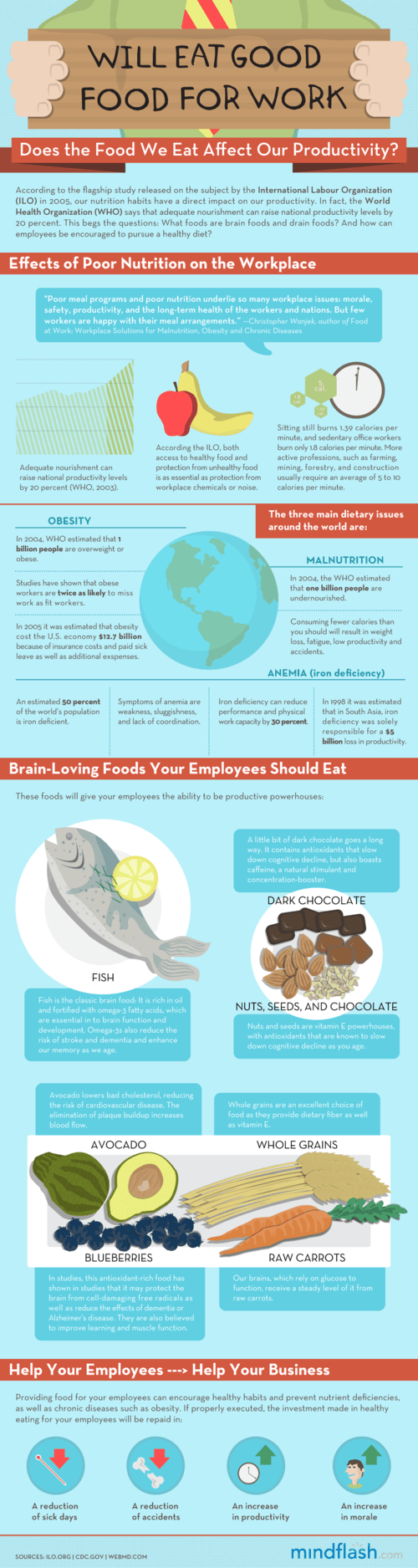
Does The Food We Eat Affect Our Productivity?

“Guy Kawasaki visited Ireland to deliver his Art Of The Start talk at the Irish Software Association’s annual conference. His ‘Irished-up’ version of the talk was warmly received by a packed house. Despite his busy work and tourist schedule (this was his first visit to Ireland) Guy found time to sit down and discuss his online life, how he stays in touch with everything that is going on out there, and his new venture, Alltop.com.” Guy Kawasaki is one of the greatest entrepreneurs of this generation. Click here to read his perspective on life online…

Image representing MeisterLabs GmbH as depicte...
Image via CrunchBase

I do! It’s one of the most important skills or disciplines I’ve developed over the past 3 years. Lifehacker recently surveyed their readership to find the best mindmapping tools…

Mind mapping is a great way to add structure to brainstorming sessions and visualize your ideas. Check out the applications your fellow readers use to do their best brainstorming.” Source: Hive Five: Five Best Mind Mapping Applications 

Go to the source and read about the 5 favorites. Personally, I use Freemind, Mindmeister and Xmind in that order. What are your favorites? Comments please…

Update 10/21/09: Since I wrote this post back in March of 2009, I have become disenchanted with Xmind due to their difficult to manage licensing scheme. I have become enthralled, however with MindManager Pro. Whenever I have something I need to figure out for myself or want to explain to someone else [like a screencast] chances are I’ll mindmap it first to help me make sure I cover all the bases. I also use Mindmeister quite a bit primarily because of their cloud computing approach to mindmapping. I can publish a mindmap on the internet and embed it in a post like this:

They also have an iPhone app that flawlessly syncs with the online version. These days, chances are I’ll start my map in MindManager Pro and make it public in Mindmeister when it’s ready to go. Only problem is that MindManager is very $$$. You can duplicate the same workflow with Freemind [which is free] and Mindmeister. Questions? Feedback? Leave a comment or use the contact page to reach me — if you contact me, I’ll send you an invitation to try out Mindmeister!

Image representing Google Reader as depicted i...
Image via CrunchBase

Are you still getting email newsletters? I’m doing everything I can to eliminate them and keep my inbox for ‘just in time’ information only. Wait! Where do I get the information which was contained in those newsletters? Through newsfeeds. Here’s a post that might help you get started…

“Do you have a huge number of blog and news feeds in your feedreader that you can’t possibly keep up with on a daily basis? Or, on the other end of the spectrum, have you resisted deciphering those three little letters, RSS, and continue to check your bookmarked links regularly to see if your favorite web pages have updated?

Now there is a new — and incredibly simple — solution. Guy Kawasaki, whom I used to read in Macworld Magazine when he was the original brand evangelist, recently started a new network of websites called Alltop.com. Based on the popurls model, the sites — each focusing on a specific topic — show the latest five posts from a wide range of news sources and blogs covering that topic, all on one page. Topics include celebrities, health, “green,” social media, small business and many others.

I suggested to Guy that he create a “nonprofit” topic and worked with him to identify news and blog feeds that should be included. And that’s how nonprofit.alltop.com was born.”

Whether you take the Alltop approach or use the free Google Reader to subscribe to feeds — just do it! Getting newsletters out of your inbox and into your browser is a great way to resist following the rabbit trail of an interesting newsletter in the middle of your work. Save your inbox for action and your newsreading for a newsreader! Contact me if you’re interested in learning how to make the switch…

Image representing Google Reader as depicted i...
Image via CrunchBase

Here are 4 great ways to find rss feeds for Google Reader

  1. Use the ‘add a subscription’ button in Google Reader to search for great content…
  2. Search for great content using Alltop and add their feeds to your Google Reader account…
  3. Click the rss feed icon on any page and add it to Google Reader…
  4. Search for specific content using Google Alerts and add the feed to Google Reader…
  5. Add your own great ways in the comments!

I’m a firm believer in the power of Google Reader to consume and publish great content — use the search box to find other things I’ve written about it. If you have questions do like Donna did and give me a call — I’ll be happy to show you how it all fits together…

Reblog this post [with Zemanta]

I’m a huge fan of Lee LeFever and the team at CommonCraft — no one does short, simple, insightful technology explanations better than they do and this quick tour de force on Twitter is no exception. I encourage you to watch this as well as all the great videos the have over at their YouTube channel

Image representing Gmail as depicted in CrunchBase
Image via CrunchBase

Nice praise for one of my favorite tools…

“Financial Times reports that Gmail has about 100 million users and the growth rate is still significant: “[Gmail] has been gaining ground in the US over the past year, with users growing by more than 40 per cent, compared to 2 per cent for Yahoo and a 7 per cent fall in users of Microsoft’s webmail.” 

Even though the competing mail services improved their offerings and storage is no longer an important differentiator, Gmail still offers an unmatched user experience. After using Gmail, you’ll no longer understand why Yahoo Mail places the “Send button” above the message, why Yahoo Mail thinks it’s more important to show news and weather information instead of your inbox, why Yahoo Mail still charges for features that are available for free in Gmail, why Hotmail shows a large banner at the top of the page or why you can’t auto-forward mail to a non-Hotmail account. Gmail made so many right choices that it’s easy to ignore some of its quirks, downtimes or bugs.” Source: On Gmail’s Success

Don’t forget that you can also outsource your corporate email to Google as well! Ask me how…

I am thoroughly enjoying Gina Trapani’s book “Upgrade your Life“. Here’s a sample of the great content from the book…

“You don’t need to remember 100 passwords if you have 1 rule set for generating them. One way to generate unique passwords is to choose a base password and then apply a rule that mashes in some form of the service name with it. For example, you may use your base password with the first two consonants and the first two vowels of the service name. Say your base password is “asdf.” (See how easy those keys are to type?). Then your password for Yahoo would be ASDFYHAO, and your password for eBay would be ASDFBYEA.” Source: Geek to Live: Choose (and remember) great passwords

Go to the source to read more. And you’re welcome. For the tip about passwords, that is…

Connecting (Chris Brogan)
Image by petermello via Flickr

If you want better answers, ask better questions. I most recently heard that by listening to a Tony Robbins CD (wrote about that here), but I’ve heard it before. The thing is, with all good advice, if you don’t hear it often, it falls under the waves. So, I’m here to repeat it.

“If you want better answers, ask better questions.”…

I was reading the latest issue of Entrepreneur magazine, about the guy who started the Ace Hotel, and about how it’s turning into a branding thing. I felt a bit of joy and a bit of envy. I started thinking, “What can’t I have a brand like that?” Of course, if you look at the phrasing of the question, what I’m asking is for all the negative reasons why I don’t have that. So, I rephrased:

“What could I do to roll out a brand that means something and transforms across more than one platform?”

This answer was much better. It then made me think of ways that I could grow what I’m working on and really get it into the mindset of a brand. How?

Couldn’t agree more with Chris Brogan — I believe intelligent question asking is the single most important skill anyone can possess. Agree/disagree?

Have multiple computers? Across multiple platforms? Forget about usb sticks and all that jazz. Check out Dropbox…

“In mid-September, the file sync-and-store service Dropbox came out of private beta, boasting smooth file synchronization between computers and across platforms. I gave it a try on Windows and Ubuntu Linux, and I was quite impressed by what I found.

Dropbox is part online storage, part data back-up, part file-sharing, and part data synchronization. After you install the free program, the Dropbox icon appears in your system tray. Click on the icon to open the “My Dropbox” folder. All the contents of this folder are automatically synchronized with the Dropbox servers and any other computer you have Dropbox installed on. The files in that folder are then available on your other computers or through the Dropbox website. The folder acts like any other folder on your computer, and it also shows up in your My Documents or Home folder.” Source: DropBox review | BestFreeApps

I have used this for months without incident — in fact, Dropbox just saved my bacon because it holds on to deleted files and allows you to resurrect them. How cool is that? Sign up for your free account here!

If you’re an Outlook user and want to be more efficient, I highly recommend this new white paper from David Allen…

“For those of you working with Outlook 2007, you might want to get the new GTD & Outlook 2007 whitepaper. We overhauled the previous Outlook document with new tips, tricks and strategies for maximizing Outlook for your GTD system. You’ll also find new instructions for setting up categories in 07 (although customizing your tasks view has stayed exactly the same.) ” Simply GTD with Kelly: GTD & Outlook 2007

Click the link to purchase — it’s only $15.00…

“Today, I was firing off a couple of emails when I noticed that the message count in the top corner said, “483 Messages”! I decided enough was enough and began doing some more research into managing my inbox. I checked up on lifehacker.com, 43folders.com, and a few others to see what was going on. One of the best words of wisdom I found, however, rested in Scott Hanselman’s blog.

Remember that your inbox is not storage, it’s a list of what hasn’t been categorized yet.

This is exactly what my inbox had become. Sure it was kind of handy to have every email that I have received in the past year within a couple of pages, but I thought there must be a better way to manage it. I will list a few of the resources that I picked up, but let me sum most of them up.” Click here to read more…

Reblog this post [with Zemanta]

In case it’s not obvious by now, I’m very passionate about ‘enabling’ technology – technology that enables people to go beyond themselves and accomplish great things. My favorites sites are sites like Lifehacker, Mashable, Stepcase Lifehack, etc. – you get the point! I read the geeky stuff looking for good, fast and cheap tools so that my clients don’t have to – I keep my fingers on the pulse of what’s happening technology and productivity-wise for you…

Because I’m out there on the cutting edge, I see a lot of great stuff come and go and each year it seems there’s ONE BIG THING I discover that changes the way I work forever. Last year for example, it was ‘mastering’ WordPress – that one thing had a fundamental impact on my business and my life, in fact, most of my business now revolves around WordPress in one way or another. Well, if someone asked me what is the coolest tool or technology I’ve mastered in the past five or ten years, my answer, without a doubt would be rss feeds and readers. RSS? Yes, RSS! Continue reading “Tactic #2: ‘Listen’ to the internet…”

Does this sound familiar?

“I routinely declare email bankruptcy and simply delete my entire inbox. But even so, I currently have 2,433 unread emails in my inbox. Plus another 721 in my Facebook inbox. and about thirty skype message windows open with unanswered messages. It goes without saying, of course, that my cell phone voicemail box is also full (I like the fact that new messages can’t be left there, so I have little incentive to clear it out).

How do I deal with email now? I scan the from and subject fields for high payoff messages. People I know who don’t waste my time, or who I have a genuine friendship with. Or descriptive subject lines that help me understand that I should allot a minute or more of my life to opening it and reading it.”

Wow. Talk about a dysfunctional way of handling communications! Are you having problems like this? Here are a couple of ideas…

  1. Use Gmail. No other ISP offers the tools to handle large volumes of email like Gmail…
  2. Read ‘Getting Things Done’ by David Allen. If you’re in a hurry, skip to #3…
  3. Check out Inbox Zero

If you can’t implement it on your own, scroll down and give me a call — I’ll be happy to help you out…

Reblog this post [with Zemanta]
gmail icon
Image by adria.richards via Flickr

When did you last check your email?

I’d bet it was within the last hour. Quite possibly within the last ten minutes. You might well have your inbox open right now, with message alerts jumping up at you.

Almost everyone I talk to feels that email takes up too much of their time. If you work for an employer, in a traditional office environment, you might have your email open from the moment you get into the office until the moment you shut down your computer at the end of the day.

(And you’ve probably checked email after hours or on the weekends, too.)

If you’re self-employed or work from yourself, it’s probably even worse. You might find yourself worrying about emails during dinner, or when you’re supposed to be having some family time.

The problem isn’t knowing what to do. You’ve read plenty of advice telling you to close the inbox, to avoid checking emails first thing in the day, and to get on with your key tasks first. But are you doing it?

There’s this and there’s the tool that you’re using to manage email. Have you looked into Google Apps for your business? I guarantee you it will make you more productive if you take the time to learn the paradigm! Comment, call or use the contact form to discuss how this applies to your organization…

“I’ve had a few conversations with IT executives from Fortune 500 companies in the past several weeks, and I’ve been surprised by how often a new enterprise-software company kept getting mentioned. The company?

Google.

Google has the problem of putting finish on a lot of its products, leaving things in eternal beta, but the price point for Google Apps is forcing even the biggest of companies to seriously consider Google instead of a Microsoft Office 2007 upgrade. (Google Apps: It’s not just small customers anymore.)

We may be getting to the point where Google’s ‘cloud’ allows them to provision users so much cheaper than any given enterprise can that it will become the provider of choice.”

John Jantsch
Image via Wikipedia

John Jantsch recently wrote on the topic of “Profiting from other people’s content”. He says…

“Don’t be alarmed by that title — I’m not talking about stealing content for gain, I’m talking about adding the filtering and aggregating of content to your content consumption, creation and sharing routine.

Pretty much everyone has bought into the idea that they need to produce lots of valuable content in order to build the trust and search engine eyes of today’s online prospect. One way to supplement your content strategy while still providing lots of value, is to get good at finding and filtering other people’s content that your prospects and customers will find useful as well. (Done right, the other people will thank you for giving a wider audience to their content).

It should go without saying that giving credit to the original source and full attribution to the author when appropriate is a must.” Source: Profiting From Other People’s Content | Small Business Marketing Blog from Duct Tape Marketing

John talks about his “consumption, creation and sharing routine” — my mantra is ‘listen, publish, promote’ which is a little more elegant in my book but we’re both trying to say the same thing and use an alliteration in the process. If I were John, I might go for ‘consume, create, communicate‘ — in fact, I might start using that instead. Either way, the point is that gathering good content effectively and commenting on it is a great way to build your personal brand. I’ve been using this strategy for years — most recently, I amped it up by using Posterous [another tool that John advocates] and saving more content directly to my blog instead of shared bookmarks as I used to do. Here are the results:

I think the results are really quite good for an ‘army of one’, don’t you? I do all my ‘creation and communication’ as a result of my daily ‘consumption’ — because my system is easy to implement and use, I work it frequently. I call quoting other sites ‘curation’ and my rare original thoughts ‘creation’. The curation works to draw people to my creation. Does it work? You betcha [you’re reading this, aren’t you?]. The average person drawn into my blog through effective communication reads 3.3 pages and spends 2:52 minutes on the site, while only 4.75% ‘bounce’ to another site. Over 71% are new visitors…

Jantsch goes on to give three tactical implementations of his ‘profiting from content’ suggestion. They are…

Make yourself a better resource

Creating a habit of filtering content related to your industry, products, competitors and customers will make you better at what you do, allow you to keep up with trends and give you data to help you build deeper relationships with customers.

Share content to draw attention

Pointing out useful resources and good finds is a great way to build your social media and blog followings. Consistently sharing relevant links and sharing them on Twitter is a strategy that many find helps them be seen as follow worthy. Creating a once a week blog post roundup of good stuff is a great way to add content and keep readers engaged.

Filter personalized content

A more advanced strategy is to use your filter skills to create your own industry research briefs. If you specialize in several market niches you can create laser specific new pages and email newsletter roundups that feature the best of what you find each week. You can even use RSS technology to deliver dynamically changing web content password protected for your best clients.” Source: Profiting From Other People’s Content | Small Business Marketing Blog from Duct Tape Marketing

Clearly, John and I share a lot of the same ‘common sense’. He goes on to list 10 different resources [you can follow the link] you can use as tools to find other people’s content. One of them — Kurrently — is one I’ll have to add to my toolkit. For me, however, this is where we part ways. My paradigm is “Google Reader is the answer. Now what is the question?“.

I use Google Reader like a tactical nuke. It’s the one tool I use to manage the ‘rest of the internet’ and I use it like a virtual newspaper or better yet, news bureau, where I manage hundreds of little newsbots that do my news aggregation for me. I have 5 great ways to get relevant content into Google Reader and they include most of John’s 10 tools — it’s just that in my book, Google Reader is the one tool that rules them all. It really is the driver in my ‘e1evation workflow’ outlined below. Either you get it and you can use it or I can help you implement it but the point is that if you have a brand and you want to build it online, we can help…

Image representing Google Reader as depicted i...
Image via CrunchBase

Yesterday, I passed the 400 post mark. 400 posts over 18 months. Wow! Roughly a post a day for a year and a half. Is that a lot? Is that too little? I really don’t know. What I do know is this — when I use my ‘pass or play’ methodology, traffic to my site increases and my ‘pipeline’ fills…

My good friend [and brother in law] Jim Gilligan has a blog that he’s starting for his life coaching business at EffectiveLiving, LLC. Jim asked me how many posts he should create before he goes ‘live’. I told him a dozen or so is enough to get started but recently I did an experiment and I believe the number at which you start to see good results is closer to 100 over a 3 month period. Here’s a real world case study… Continue reading “400 posts”

Start a Blog at WordPress.com.

Up ↑