 Think different! No, I don’t mean buy a Mac — I just mean think before you buy. A friend of mine asked for a recommendation on a big, expensive notebook — you know, one of the ones with the big 17″ monitor? My advice to him was “my recommendation would be to avoid the big, expensive notebook. I would consider a big, expensive desktop combined with a small, inexpensive netbook — it will cost the same and you won’t need to pay a premium for a premium notebook. Give me a call if you want to talk more…”
Where does this bias come from? Maybe from the fact that these über-notebooks, or desktop replacements as they are commonly called, are getting so big and heavy that they’re really a pain in the back to carry around. A couple of years ago I bought a 17″ notebook from HP and after awhile, I traded it with my son for a smaller, lighter computer. I got tired of trying to fit it in my backpack an lugging it around — so tired that I was willing to accept a lesser computer in exchange for the ease of use! It was such a big process to get it out of my bag and fired up that I started looking for excuses not to…
Here’s my belief; most computing is context sensitive. Think about it. Do you really need to run Photoshop on your smartphone? No — if a good picture is worth editing, you’ll probably wait until you get home and use the desktop computer with 24″ monitor that only cost $700. My current thinking is this: instead of paying $1,000 for a high end consumer notebook, get a desktop with a big monitor, a netbook and a smartphone that runs the android os. Boom! Now you have a solution that delivers power when and where you need it, a portable tool that allows you to interact with the internet for those times you need a bigger keyboard, and a phone that will do a lot of heavy lifting without ever having to take that netbook out of the bag. Make sense? I’d like to hear your comments…
If you decide to go ahead and get that big notebook, know this:
“Laptop magazine went through the painstaking process of calling the tech support of every major notebook manufacturer. And they timed their waits before asking one of two very basic questions. The results may not surprise you.
Apple scored the highest with an A overall (that’s a combined score of online and phone tech support). HP, Acer and Dell tied for lowest with C- each.” Source: Laptop Mag Determines Acer, Dell and HP Have the Worst Tech Support – Technical Support – Gizmodo
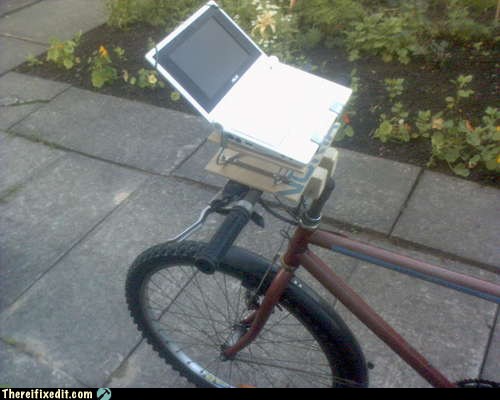
Despite this, I’m sold on the HP brand and my experiences have not been bad — admittedly this may be due to the fact that I can perform a great deal of the tech support that most people need on my own, but I haven’t had quality issues and I keep my machines running well thanks to Tune Up Utilities, etc. If you can’t resist that über-notebook buy an HP that works with the XB-3000 [pictured above] — that way, you can have the best of both worlds! You can pick them up on eBay for around $100…
I hope this post wasn’t too confusing — the truth is that buying new equipment is really a context sensitive thing and should take into account how much time you spend in your office versus mobile, etc. and I’d be happy to talk through your issues with you. Leave a comment or use the contact form — I’d love to talk it through with you…


![Reblog this post [with Zemanta]](https://i0.wp.com/img.zemanta.com/reblog_b.png)


![Reblog this post [with Zemanta]](https://i0.wp.com/img.zemanta.com/reblog_e.png)
 Bright, shiny objects!
You must be logged in to post a comment.