Google Tasks

Chrome Web Store – Google Tasks (by Google)

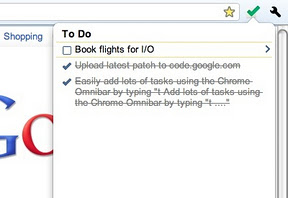
Easily add and manage your tasks from Chrome in one of three ways:

  • Simply type “t Your new task” into the Chrome Omnibar to easily add a task from whatever web page you’re on.
  • Click the Tasks icon to add a task, see your tasks and task lists and mark a task as completed
  • Highlight text on any web page, right click and add that text to a new task.

Tasks are visible everywhere that you can see your Google Tasks – in Gmail, Calendar, iGoogle, Mobile and via the Google Tasks API.

This extension has been released as an example of the Google Tasks API, and can be viewed and contributed to at https://code.google.com/p/google-tasks-chrome-extension

Please note that if you sign into multiple Google accounts you should ensure that the first account you sign into is the account you wish to use when managing Tasks via this extension.

Get some!!!

Google Tasks

I normally post my tech tips over at my business blog but this one will help with your personal productivity if you’re a Gmail — and you should be — user…Chrome Web Store – Google Tasks (by Google)

Easily add and manage your tasks from Chrome in one of three ways:

* Simply type “t Your new task” into the Chrome Omnibar to easily add a task from whatever web page you’re on.

* Click the Tasks icon to add a task, see your tasks and task lists and mark a task as completed

* Highlight text on any web page, right click and add that text to a new task.

Tasks are visible everywhere that you can see your Google Tasks – in Gmail, Calendar, iGoogle, Mobile and via the Google Tasks API.

This extension has been released as an example of the Google Tasks API, and can be viewed and contributed to at https://code.google.com/p/google-tasks-chrome-extension

Please note that if you sign into multiple Google accounts you should ensure that the first account you sign into is the account you wish to use when managing Tasks via this extension.

twitter logo map 09

An editorial focus and calendar that reinforces it may be the single most important thing you can do if you want to blog for thought leadership. In his ground breaking book ‘Brand Stand’, Craig Badings writes…

The more research you do on the topic [on which you choose to focus] the more you will understand the space you want to enter. Ask yourself: Who is already playing in that space? What they are saying? Are they achieving cut through? Does our company have substantially more to say or something unique to offer in that space or not? Your deciding question should be ‘Can we own that space?’ If you cannot own a space my advice would be do not go there.

Badings, Craig (2009-07-08). BRAND STAND (Kindle Locations 790-794). BookPal. Kindle Edition.

If you have decided you can ‘own the space’, here is an overly simplified formula for achieving alignment in your content marketing strategy and getting ownership:

  • Brainstorm around your unique offerings in the space. Ask yourself “what are the problems my clients expect me to solve and how do I solve them in a unique way?”
  • Use Google’s keyword tools to research keywords around those unique offerings
  • Track trusted sites and keyword searches in Google Reader; read primarily those things that deepen your expertise in your unique offerings without losing the context of the whole space
  • Only curate or create content on your blog related to that unique offering
  • Leverage social media, etc. to amplify your content
  • Connect effectively with the readers you draw in

If you do those things in that order, you will have alignment around solving your customer problems and you will be found when people are looking for your solution[s]. In order to effectively cover my space, for example, which is content management and marketing for thought leadership, I track the topics content management, content marketing and ‘thought leadership’ marketing as well as the following tools:

  • Blogging
  • Facebook
  • Google+
  • LinkedIn
  • Twitter
  • and supporting tools like Google Reader, Shareaholic, Storify, etc.

Thursday, for example, is Twitter day. Every Thursday I reflect on Twitter as part of a balanced content management and marketing for thought leadership strategy and ‘storify’ a summary of the best articles from the previous week. This tactical approach ‘forces’ me to not only review the best content from the previous week in Google Reader and Twitter, but be sure to cover it in my blog.

Questions? Feedback? Comment below or use the connect form. In the meantime, here’s a summary of the best of what I found in content marketing, LinkedIn and Twitter this past week…

http://storify.com/e1evation/content-marketing-linkedin-and-twitter-for-2-17-20

Enhanced by Zemanta
Image representing Research In Motion as depic...
Image via CrunchBase

Things we’ve been tracking in the past 24 hours… 


Google Calendar is a contact- and time-managem...
Image via Wikipedia

The folks at Lifehacker took a poll on the top calendaring applications. Here are the results…

“Nothing’s more important to your productivity arsenal than a solid scheduling tool, and considering so much of what we do happens at the computer, a good calendar application is just the thing to bring order to your agenda. On Tuesday we asked you to share your favorite calendar application, and today we’re back with the five most popular answers. Keep reading for a detailed look at the top five and to cast your vote for the calendar tool you like best.” Source: Hive Five: Five Best Calendar Applications 

Me? I use Google calendars — the free one associated with my Google account as well as my business calendar in Google Apps. Go to the source to read the whole article — it’s worth it!

Tactic #8: Use ‘branded’ email

I took a little time off from my ‘tactics and tools’ series — no one’s paying attention in December anyway, right? ;-)

Now that everyone’s waking up from the holidays it’s time to get back on track with tactic #8 — using ‘branded’ email. ‘Branded’ email? What’s that? ‘Branded’ email is email that comes from a professional domain and supports your brand. Excuse me for ranting about one of my biases for a sec, but it drives me nuts when I see an entrepreneur using their sbcglobal, att, charter, road runner, etc. isp domains for conducting business — especially when there’s a great tool like Google Apps for Business! Every email is a chance to advertise your business by using a domain that points to your Facebook page or website. Besides, there’s nothing that screams ‘mom & pop shop’ more than using your personal home account to try to bring in that big deal…

Here’s a quick overview of Google Apps:

httpv://www.youtube.com/watch?v=M_TzCpYGpzw

Google Apps hits the ‘good, fast and cheap’ trifecta. Simple, yet powerful! A couple of years ago, I worked with a local entrepreneur in Green Bay that had an office with 7 people. He wanted the benefits of Microsoft Exchange and Sharepoint for his team and spent $35,000 [first year acquisition cost of $5,000 per employee] for the hardware, software, licensing, and labor to acquire those benefits. Here’s the dirty little secret; there was no benefit he acquired that could not have been done better than Google Apps at the cost of $50 per user per year…

Consider the benefits of Google Apps:

“Google’s web-based messaging and collaboration apps require no hardware or software and need minimal administration, creating tremendous time and cost savings for businesses.

End users can use the familiar Microsoft Outlook interface for email, contacts and calendar as they transition to Gmail and Google Calendar. Source: Reduce IT costs, get less spam, and improve productivity – Google Apps for Business target=”_blank”

But wait, there’s more! Benefits include…

  • Proven cost savings
  • Email, calendar and IM access from any computer or smartphone connected to the internet, regardless of platform…
  • 99.9% uptime reliability guarantee
  • 50 times more storage than the industry average
  • Information security and compliance
  • Full administrative and data control
  • Helpful 24/7 customer support

Go here to read more…

Wow! A lot of cool features you say, but is it safe?

“Google applications provide a variety of security features, says Eric Ogren, a security analyst with the Enterprise Strategy Group. For one thing, “you have to have authority to get in. Users can determine policies of who looks at a particular document, the amount of collaboration offered, and users have the flexibility to store data on their corporate laptop or have Google do it for them.”

In addition, he voices the security argument most commonly heard about SaaS solutions: “The customer’s IT department doesn’t have to maintain upgrades, so you don’t have to deal with patches with Google Apps, and that’s a nice feature.” Source: Google Apps has its advantages, but is it secure? – SC Magazine US target=”_blank”

Google Apps for Business is THE killer app for entrepreneurs, small businesses, non-profits, schools, and political campaigns. If I didn’t make myself clear, comment, call or contact so we can talk further about your particular situation…
Making the switch from Microsoft Office to Web apps

Image representing Bill Gates as depicted in C...
Image via CrunchBase

‘For him who has ears to hear!’ as the Good Book says. It’s possible to have a powerful computing experience without using a single Microsoft product [or paying a single penny to Bill Gates]…

“The only reason I’ve opened Microsoft Outlook or any other desktop e-mail program in the last year is to test tips. Since I added my ISP account to my Gmail in-box, and moved my Outlook appointments to Google Calendar, I get all the information I need in my browser.

Now I’m getting ready to boot Word, Excel, and PowerPoint for their Web alternatives, but before I bail on Office entirely, I stuck a toe in the Web-apps water by using the free ThinkFree Online service irregularly over the past few weeks. So far, I haven’t missed Word, Excel, or PowerPoint one bit. In fact, I appreciate the comparative simplicity of their Web counterparts, which have worked without a hitch–so far, at least.”

Click here to read more…

Reblog this post [with Zemanta]

Start a Blog at WordPress.com.

Up ↑