Are you overwhelmed by email? Use ActiveInbox!

I’m a huge fan of Gmail, but using ActiveInbox makes it even more useful for me! What is ActiveInbox? It’s an extension for Chrome that incorporates David Allen’s Getting Things Done [GTD] principles right in your inbox. Here’s a video of the new features coming online…

http://www.youtube.com/watch?feature=player_embedded&v=W8sCRSCAK_A

Questions? Feedback? Please comment below…

My 5 favorite Gmail features…

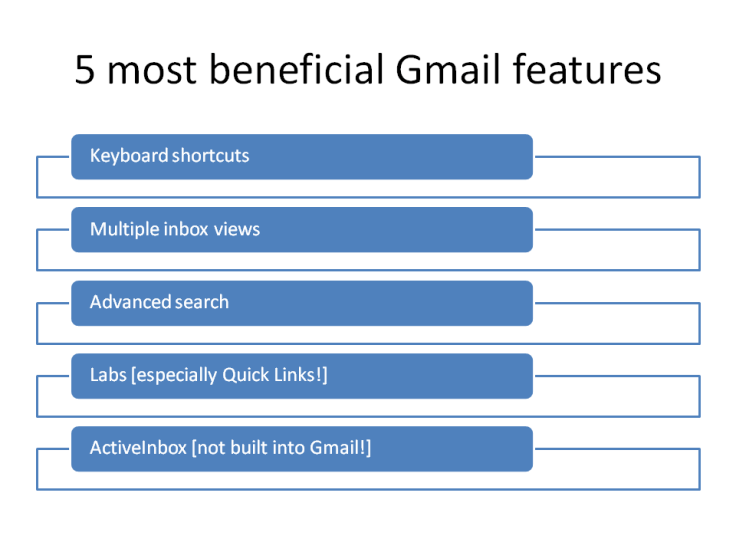
5 most beneficial Gmail features

The post My 5 favorite Gmail features… appeared first on Living Business.

via Living Business http://business.toddlohenry.com/2013/08/16/my-5-favorite-gmail-features/

My 5 favorite Gmail features…

5 most beneficial Gmail features

Let me explain:

http://youtu.be/lKnGSCicmL8

Here’s the link to the advanced search operatorsI promised you. Questions? Feedback?

I’m always trying to explain things in a way that is as simple as possible but no simpler, so I thought of another way to take a pass at David Allen’s Getting Things Done [GTD] principles as applied to the curation process. Here is the workflow map:

Here is how I apply it to the curation process:


Now, let me talk you through it:

Here are the two posts I mentioned in the screencast:

Over at Lifehacker today, they’re talking about the Dark Side of Getting Things Done [GTD] but here at e1evation, llc, it’s all rainbows and unicorns and we’re talking about how to apply Getting Things Done [GTD] to the curation process…

Now if you haven’t read David Allen’s classic productivity work, this would be a great weekend to do it. You can click the image to the right in order to purchase and download a copy to your Kindle or Kindle software immediately. I like to repost he Getting Things Done [GTD] workflow diagram as a reminder of the options…

…in this screencast we’ll be using Google Reader as the ‘in basket’ and the ‘stuff’ we’ll be processing is the articles that come from our trusted sources. We’ll be using Twylah and Power Tweeting to process our actionable items. Give it a view…

Why Twylah?

Questions? Feedback? Want to apply Getting Things Done [GTD] to your curation process? Use the form below or connect with me in social media…

[ contact-form] [contact-field class="zem_slink" title="Record label" href="http://en.wikipedia.org/wiki/Record_label" rel="wikipedia" target="_blank">label</a>="Name" type="name" required="true" label="Name"/] [contact-field label="Email" type="email" required="true"/] [contact-field label="Website" type="url"/] [contact-field label="Comment" type="textarea" required="true"/] [/contact-form]

Stick to the 3-B Plan when Emailing Busy People

Gregory Ciotti writes this:

If you want to get in touch with influential people (aka: BUSY people), you need to know how to contact them. Despite the buzz around social media, far more people use email to communicate than any other online medium, and business today still gets done over email, not through tweets. Sparring Mind’s Gregory Ciotti explains how to make things happen over email with the 3-B Plan.

Why it’s Important to Know

Knowing how to write outreach emails might seem like a no-brainer or maybe even an unnecessary skill to have, but I can assure you the opposite, on both accounts. If you’re serious about networking and building your platform/personal brand, you MUST know how to email important people. Important people are busy people. You can’t rely on random encounters to get in touch with people who can help you flourish; while it may happen once in a while, the rest of the time it’s up to you.

Due to the fact that tweeting is so impersonal and a cold phone call is so annoying, email is the ideal platform for reaching out. For busy people, even their inbox is something that is viewed as a “task,” meaning they want to get in and out as quickly as possible. Understanding how to properly email people is a skill that sets you apart from others (trust me, I’ve received some truly awful emails) and is essential for making things happen with influencers.

The 3-B Plan

When deciding whether to read or delete an email, our brains go through this common evaluation process:

1. Who is emailing me (and is this spam)?
2. What do they want?
3. How long will this take?

Getting a “pass” on all 3 of these can be tougher than it looks, especially for busy people. Here’s my 3-step technique to avoid the trash bin.

I call it the 3-B plan. I always double-check my emails to make sure they follow the guidelines below, and I’ve been able to get some fantastic response rates.

Brevity

If there is one thing that busy people value above all else, it’s brevity. If you were receiving upwards of 50-100 emails per day, or had so many obligations that you were only left with a short amount of time to check email, it’d be easy to see why. In order to get your messages read ASAP, it’s best to make sure your opening email follows the ASAP rule: as short as possible.

I wouldn’t put a set limit on email length, because it’s a case by case basis. The important thing to remember is to always edit your emails at least once to trim unnecessary information. People don’t need your enthralling life story over email, they just need “who, what, why” so they can get back to business.

Blunt

Being blunt doesn’t mean not being persuasive, it simply means getting to the point without trying to be clever. Stories and jokes are essential for other forms of writing, but NOT for emails. Get to the incentive on why the other person should respond right away.

If possible, list a number in the title to signal commitment time (Ex: “3 quick questions”) and state exactly what the email is about in the subject line.

Basic

I sometimes am in disbelief that this one needs to be said, but it’s so true. I’ve had emails where people send what looks like a newsletter, emails with tons of images in them (so I have to click “display images” to even read it), and emails with a DOZEN attachments. When it’s your first time emailing someone…

Keep it simple, stupid.

Read Greg’s complete 9-step email guide here.
Source: Stick to the 3-B Plan when Emailing Busy People
To this I would add one thought that is becoming obvious to me lately. I divide information into two categories; just in time and just in case. Just in time is information that affects relationship and revenue and should go in an inbox. A link, however, is most often just in case information. Now, think about the context of the person receiving the information and where they will receive it. If your communication is ‘just in time’ then follow the rules above to get a response – I even go so far as to try to limit my communication to the amount of space available in a single smartphone screen or limiting the message to a single thought so that the busy person on the other end [who is hopefully a Getting Things Done [GTD] practitioner] can do it in two minutes or less. If I’m sending a link, however, why not send it to them in their favorite social network? You will find them in a context where they are already looking at links anyway! I believe that if you think about the context in which a busy person will be reading your message and you communicate accordingly, you will eventually move to the top of the heap. What do you think?

Good stuff, David. I’m doing a series on Getting Things Done [GTD] on the internet. Coincidentally, I wrote about Email last week here: http://e1evation.com/2012/10/05/getting-things-done-gtd-in-email/

Live & Learn's avatarLive & Learn

PrintI’m productive. Efficient. I’ve been told by many – obsessively productive and efficient.  I chew up tasks and spit them out.  Yet, one can always be more productive, right?  I’ve been in a life long search for the Holy Grail of a Zero Email Box solution at the end of each day.  A search for the best To-Do program.  A hunt for a better way to manage projects. A race to squeeze more into each day.  I believe being more productive is possible. Within reach.  Just within the ends of my fingertips.

So, when I came across Robin Sharma’s post titled “Become The Most Productive Person You Know”, I was like Zeke on his bone – on it.   When Sharma opened his post by stating: “I want to help you create explosive productivity so you get big things done (and make your life matter)…”, I was giddy. …

View original post 1,359 more words

Does your inbox look like this? If not, why not? There really is no excuse especially when you combine David Allen’s Getting Things Done [GTD] principles with Google’s powerful Gmail technology…

Effectively handling e-mail is a passion of mine; I believe that the ability to effectively handle e-mail separates the sheep from the goats in the business world. How can you ever aspire to thought leadership if you can’t get out of your inbox? I have been using e-mail since 1994 and I remember initially how excited I was to get newsletters in my inbox. I thought to myself how cool is this? I can have companies send me news?!? Now, almost 20 years later I’m doing everything I can to hunt down and kill newsletters in my inbox and instead consume the information in Google Reader!

As someone who is so passionate about e-mail I read a lot of different articles about various strategies for achieving Inbox Zero. Not once however have I heard someone offer this simple advice: jealously guard your inbox! Only allow things into your inbox that are related to relationships or revenue. Everything else belongs in Google Reader. When you do email do email and save news for a time to look at news! If if you will follow that one simple rule and implement some of the steps that I outline in this screencast, you will once again become master of your e-mail domain!

Questions? Feedback? Next week? Getting Things Done [GTD] in Google Reader…

Bonus Gmail screencasts…

Older Gmail screencasts…

This is what inbox zero looks like…

Having a system or process for any ‘easy to empty’ inbox makes me feel good and ready to take on other creative activities…

I work with my clients to help them reach inbox Nirvana as often as they’d like by applying David Allen’s Getting Things Done [GTD] principles to ‘personal news aggregation’ using Gmail and Google Reader…

If you’d like to experience more of the peace and productivity that comes from effectively handling email, please connect with me using the form below…

Go back

Your message has been sent

Warning
Warning
Warning
Warning

Warning.

Getting Things Done [GTD] on the Internet…

Today I’m announcing an epic series called Getting Things Done [GTD] on the Internet. Every Friday for the foreseeable future I will post on some aspect of applying David Allen’s classic work “Getting Things Done” to the basics of Internet marketing…

I’d like to start by thanking those of you who have not read David Allen’s book — you have given me a competitive advantage for years! Seriously, though, I’m continually surprised at how many people have not read this classic work. For me, it ranks among the three best business books I’ve ever read. It’s right up there with the seven habits of highly effective people and that is saying a lot for me. In fact, I think these two books go together like peanut butter and chocolate; Stephen Covey‘s book provides a strategic framework on David Allen’s book gives great insight on how to implement Covey’s framework…

Allen says:

THE CORE PROCESS I teach for mastering the art of relaxed and controlled knowledge work is a five-stage method for managing workflow. No matter what the setting, there are five discrete stages that we go through as we deal with our work. We (1) collect things that command our attention; (2) process what they mean and what to do about them; and (3) organize the results, which we (4) review as options for what we choose to (5) do. This constitutes the management of the “horizontal” aspect of our lives—incorporating everything that has our attention at any time.

Allen, David (2002-12-31). Getting Things Done: The Art of Stress-Free Productivity (p. 24). Penguin. Kindle Edition.

In my practice, my emphasis is on what I call “practical, tactical social media“. Chapter 2 of Allen’s book gave me a tool that I apply in multiple was to the social media process…


In the next couple of weeks, I’ll be talking about how to apply this diagram to everything from email to social media management, including…

  • Getting Things Done with Gmail, Google Apps and Google Tasks…
  • Getting Things Done with Google Reader for ‘Personal News Aggregation‘…
  • Getting Things Done with WordPress for Business Blogging…
  • Getting Things Done with Twitter for social media…
  • Getting Things Done with social media management…

I’ll also entertain ‘how would I apply Getting Things Done [GTD] to ________’ kind of questions if you have one you’d like to ask. I’ll share theses posts each Friday so you can ponder them and implement the parts you like over the weekend so stop by next Friday for Getting Things Done with Gmail, Google Apps and Google Tasks…

Here’s a reminder of some of the basic principles…

  • Save Gmail for ‘just in time’ information…
  • Use Google Reader for ‘just in case’ information…
  • Use ‘Priority Inbox’
  • Use Getting Things Done [GTD] principles for processing your email…

Questions? Feedback? Comment below…

‘Non-modal’? You’ll have to watch the video! :-D

[listly id=”1ey” layout=”full”]

Want to manage your information better?

Learn how to be a Google Reader rockstar! Join a free hangout at 15:00 CDST [GMT-6] today. Just add me to one of your circles and I’ll add you back and invite you…

I can talk about any aspect of this Google Reader mindmap you’re interested in!

Click image to enlarge…

ParadoxicalProductivity: The First 14


Nicholas Bate writes…

“1: Send Less E-Mail. Get less e-mail.

2: Tidy Up. Gain clarity.

3: Fewer People. Faster, focused and easier.

4: Use A Wall Planner Not Your Phone To Plan. The future, not just today.

5: You KNOW the problem: (1) Wake Up (2) Look Up (3) Get Real

6: Stand Up. Gain determination.

7: You Don’t Need To Be Nice. Polite, loyal and on time definitely. But this ain’t kindergarten.

8: Put the work in at the start. For an easy life later on.

9: Take A Break. It activates higher brain where the best work is always done.

10: Start at the end. Start with the result you want and work backwards.

11: Work Hard To Maintain The Relationship. Productive business needs trusting relationships.

12: Make Small, Big. And Big, Small. Get perspective/get a plan.

13: Know Your Rhythm. Follow your rhythm rather than just the Siren’s call of pure urgency.

14: Re-claim your unique advantage. Stop & Think.

The detail here.

Bonus 1:  Professionalism 101

Bonus 2: How To Be Brilliant

Bonus 3: How To Be Brilliant at Business” via ParadoxicalProductivity, Director’s Cut: The First 14.

“Information, if viewed from the point of view of food, is never a production issue. … It’s a consumption issue, and we have to start thinking about how we create diets and exercise,” said JP Rangaswami in his TEDx presentation.

For a man who currently has 38,000 books in his collection and lives in Calcutta, India where they are known for their rich, savory and sweet Southern Indian cuisine, his is a theory that could very well make sense!

Since most of us consume food according to a certain diet, minimize our surrender to sinful indulgences, measure our nutrition intake to make sure we have enough of everything; it’s possible that we’ve been doing the exact same thing all along with our consumption of data – or perhaps we should. As Plato the philosopher once said, “Knowledge is the food of the soul”.

“When I saw Supersize Me, I started thinking, now what would happen if an individual had 31 days of nonstop Fox News?” joked JP Rangaswami.

What do you think? If you saw information the way you see food, what would you do to digest the knowledge differently – nibble, bite, scoff or binge?” via How To Eat Information | FinerMinds.

Long before I saw this TEDx talk on eating information, my thinking on the topic was galvanized by Clay Johnson’s book The Information Diet which I highly recommend if you are intrigued by JP Rangaswami’s thoughts and are looking for more on the topic…

Me? I ‘eat’ information via Gmail, Google Reader and Gist and then share the best of it here and at business.toddlohenry.com, Twitter, Twylah, etc. Johnson’s book and Rangaswami’s statement about “Information overload or ‘filter failure’?” address the heart of the matter — just because I can track almost anything or anyone in Google Reader or Gist doesn’t mean I should in the same way that I shouldn’t eat everything I find at the Piggly Wiggly and I certainly shouldn’t eat it all at the same time! As the Apostle Paul said “All things are possible but not all things are beneficial” — tools without forethought result in poor tactics. Johnson and Rangaswami’s thoughts can help us ‘eat’ information on purpose instead of by accident…

If you want to ‘eat’ better, I suggest you need better thoughts, tools and tactics. One way to do that might be to read my free ebook on ‘personal news aggregation’. Register at http://elevation.company/pna/

Peter Bregman posted this at Psychology Today

I’ve come to the conclusion that I use email to distract myself. Whenever I feel the least bit uneasy, I check my email. Stuck while writing an article? Bored on a phone call? Standing in an elevator, frustrated in a meeting, anxious about an interaction? Might as well check email. It’s an ever-present, easy-access way to avoid my feelings of discomfort.

What makes it so compelling is that it’s so compelling. I wonder what’s waiting for me in my inbox? It’s scintillating.

It also feels legitimate, even responsible. I’m working. I need to make sure I don’t miss an important message or fail to respond in a timely fashion.

But it’s become a serious problem. When we don’t control our email habit, we are controlled by it. Everyone I know complains about email overload.

Email pours in, with no break to its flow. And like addicts, we check it incessantly, drawing ourselves away from meetings, conversations, personal time, or whatever is right in front of us.

Source: Coping With Email Overload | Psychology Today

Go to the source if you’d like to read the rest of his thoughts. I’d like to share with you a way that I have found to control my email habit…

Tools without thought or tactics are worthless so I try to remind myself that email is best used as a tool for ‘just in time’ information – information that affects relationships and revenue. All your ‘just in case’ information belongs in a virtual newspaper like Google Reader. Think of how much lighter your email load would be if you didn’t let newsletters and other detritus in? How often have you started down the path to Inbox Zero and then been waylaid by a Victoria’s Secret or Cabella’s catalog in your inbox. There’s a time and a place for that; the time is your ‘personal news aggregation’ time and the place is Google Reader. My advice? Use Gmail for email with a touch of Merlin Mann’s Inbox Zero and David Allen’s ‘Getting Things Done’ and you’ll be an INBOX HERO in no time!

If you’re looking for help in this area, try my online book on ‘personal news aggregation’ or how to create your own personal news agency. You can register free at http://elevation.company/pna. Here are two recent lunch and learns I did on the topic of Gmail and Google Reader as well…

How to be an ‘Inbox Hero’ with Gmail…
http://youtu.be/hq5yksbplhE

How to be a Google Reader Rockstar…
http://youtu.be/6E-sP2kCf5I

Google Tasks

Chrome Web Store – Google Tasks (by Google)

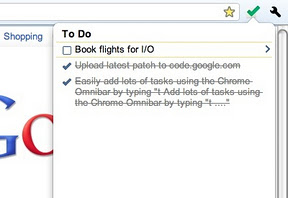
Easily add and manage your tasks from Chrome in one of three ways:

  • Simply type “t Your new task” into the Chrome Omnibar to easily add a task from whatever web page you’re on.
  • Click the Tasks icon to add a task, see your tasks and task lists and mark a task as completed
  • Highlight text on any web page, right click and add that text to a new task.

Tasks are visible everywhere that you can see your Google Tasks – in Gmail, Calendar, iGoogle, Mobile and via the Google Tasks API.

This extension has been released as an example of the Google Tasks API, and can be viewed and contributed to at https://code.google.com/p/google-tasks-chrome-extension

Please note that if you sign into multiple Google accounts you should ensure that the first account you sign into is the account you wish to use when managing Tasks via this extension.

Get some!!!

Email Is Not Broken; We Are

Gmail logo

Here’s an interesting perspective on the ‘problem’ of email…

There’s a constant flow of “email is/is not broken” articles across the internet, but most of them miss the point. Email as a system is not broken, but we, through our email behaviors, are.

Nearly all of the articles written recently about fixing email have concentrated on technology and building a better client or implementing the specs more closely or bringing two systems together. These are all great ideas and have a ton of value, but they will not fix the inherent issue that people are experiencing with email, but which most articles fail to articulate: we think email is broken because we are overwhelmed by it and get less real work done because of it.

So instead of asking how we can make email better/faster/cooler, we need to ask ourselves how we can get more work done while still using email. Unfortunately, many experiences have shown over the past decade or so that this problem is not easily solved by new technology, as much as I would love that. It is solved by teaching people better email behaviors. This is certainly a less sexy solution, but guess what? It’s the attainable one. Here are some ideas that I’ve come across from others, and that warrant further investigation. They are all designed to help us get more real work done, which is the real problem with the email timesink.

Source: Email Is Not Broken; We Are

You can go to the source and read the author’s perspective, but while you’re here consider this: I think email is ‘broken’ because we let the wrong things in to begin with — in other words, we have no one to blame but ourselves. Most peoples’ inboxes are like their kitchen junk drawers – how can they expect to find anything of value in there? Instead, try using email only for ‘just in case’ information – information that affects relationships and revenue and all that goes along with it – and use an rss reader like Google Reader for all the ‘just in case’ info. That philosophy alone will make your email infinitely more manageable! As you get more efficient, you can add David Allen’s ‘Getting Things Done‘ principles to your approach…

If you’re looking for more ideas like this, check out my free ebook on ‘personal news aggregation’. Go to http://elevation.company/pna/ and click the register button. You might also be interested in this recent post I did on effectively consuming information

Enhanced by Zemanta

Google Tasks

I normally post my tech tips over at my business blog but this one will help with your personal productivity if you’re a Gmail — and you should be — user…Chrome Web Store – Google Tasks (by Google)

Easily add and manage your tasks from Chrome in one of three ways:

* Simply type “t Your new task” into the Chrome Omnibar to easily add a task from whatever web page you’re on.

* Click the Tasks icon to add a task, see your tasks and task lists and mark a task as completed

* Highlight text on any web page, right click and add that text to a new task.

Tasks are visible everywhere that you can see your Google Tasks – in Gmail, Calendar, iGoogle, Mobile and via the Google Tasks API.

This extension has been released as an example of the Google Tasks API, and can be viewed and contributed to at https://code.google.com/p/google-tasks-chrome-extension

Please note that if you sign into multiple Google accounts you should ensure that the first account you sign into is the account you wish to use when managing Tasks via this extension.

How to be an ‘Inbox Hero’ with Gmail

Image representing Gmail as depicted in CrunchBase

Last Wednesday we began a series of ‘lunch and learn’ presentations at The Docking Station in Green Bay, WI and I am pleased to share it [almost] in its entirety below. This is the first in a series of ongoing presentations on the topic of thought leadership marketing which will be published in a book called “Be Known” on July 8, 2012.

Why start with Gmail? The answer to me is obvious; if you can’t manage your e-mail how can you be proactive in social media? Personally I don’t believe that you can ever get ahead as long as you are a victim of your inbox

I have outlined my thoughts on these topics in previous e-book called ‘personal news aggregation‘ which is free for the registration here. Just click on the word registration, supply a username and e-mail address and you will immediately gain free access. If you want to be a thought leader you have to be able to manage the content you need so that you can become and be known as the expert. The journey starts in your inbox!

http://youtu.be/hq5yksbplhE

Enhanced by Zemanta

Master your Gmail!

Image representing Gmail as depicted in CrunchBase

If Gmail is so easy, why do people still have hundreds — thousands — of unread emails in their inboxes? In part it’s because technology without good thinking and tactics means nothing…

I teach my students that email should be for ‘just in time’ information — information that affects relationships and revenue. Everything else belongs in Google Reader! My friend Dana VanDen Heuvel of The Docking Station talked me into revealing my secrets for effective email handling at an event that happens next week. Here’s Dana’s press release…

“The Docking Station, Green Bay’s first Coworking space, is inviting business professionals to take back their Inbox and attend a free course on how to master Gmail to be more effective and efficient.

“An overwhelming inbox decreases efficiency and productivity,” said Dana VanDen Heuvel, co-owner of The Docking Station. “There are quick and easy solutions to manage your email and make it work for you. A lot of people dread opening their email. This course will help alleviate email stress and make your inbox about creating relationships and bringing in revenue.”

The Gmail course will be taught by Todd Lohenry, owner of e1evation, llc, an international consulting firm that has been educating and empowering business owners and professionals for the past 7 years. “I spent two hours with Todd that will save me at least a gazillion hours. His patient coaching and time-saving processes helped me get to an inbox of zero that same day,” said Carrie Klassen, Creative Director for Pink Elephant Academy for Entrepreneurs.

The Gmail course is part of a series of free events that The Docking Station hosts as part of their mission of being an educational resource to the entrepreneur community. “Our hope is to bring professionals together and connect them to thought leaders and resources that can help them increase productivity and grow their business,” said VanDen Heuvel.

The Docking Station is one of approximately three hundred Coworking spaces in the United States that is redefining the way independent professional work. It was founded by small business owners and entrepreneurs Dana VanDen Heuvel of The MarketingSavant Group and Peter Nugent of Enlighten Financial, LLC. The Docking Station is located at 111 S. Broadway in Downtown Green Bay. To register for the Gmail course, go to http://www.thedockingstation.net/events/ or for more information call The Docking Station at (920) 644-3625.”

If you can’t make it to Green Bay, try my ebook — you can find it online at http://elevation.company/pna. Just click the register link, provide a name and email address and you’ll be on your way to a more productive tomorrow…

Enhanced by Zemanta

Start a Blog at WordPress.com.

Up ↑