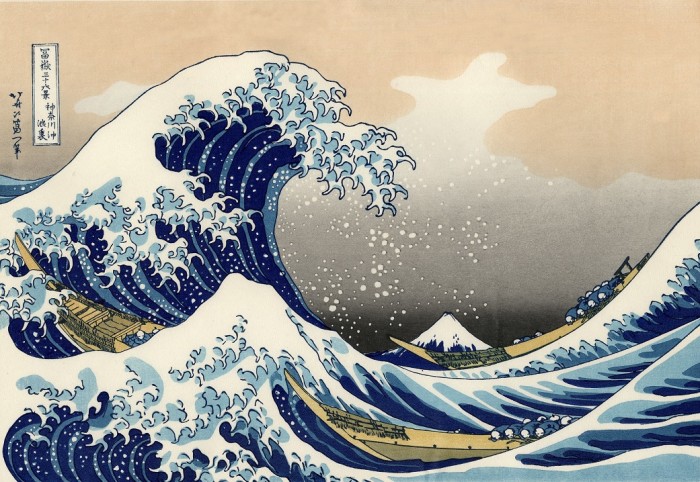
Waves…

Great-Wave-700x482

When I spin or spiral or go ‘sideways’, fear rolls over me like great waves and I am tossed about by the next crazy think that comes to my mind…

Consider this, however. Have you ever been at the ocean? Do you know what it’s like to drop below the waves and watch them from underneath? I have noticed that if you stay on the surface you can get pounded by wave after wave but if you drop a few feet below the surface, all you feel is a gentle tug.

This past weekend, I faced wave after wave of fears. I found that when I stayed on the surface, I was at the mercy of every memory and thought that rolled in but if I could drop down into myself and find a quite place, the ‘waves’ had no effect.

In her book True Refuge, teacher Tara Brach says this:

“I recently read in the book My Stroke of Insight by brain scientist Jill Bolte Taylor that the natural life span of an emotion—the average time it takes for it to move through the nervous system and body—is only a minute and a half. After that we need thoughts to keep the emotion rolling. So if we wonder why we lock into painful emotional states like anxiety, depression, or rage, we need look no further than our own endless stream of inner dialogue.” ~ True Refuge

One tool I used was to ‘pay attention’ to thoughts but journaling them in Evernote and most of ,u fears seemed to be appeased by the recognition of documentation. For the rest, I used Tara Brach’s RAIN acronym:

  • Recognize
  • Allow
  • Investigate with Kindness
  • Non-identify

If only I could claim perfection! This approach, however, did help me ‘drop under the waves’ and become happier overall…

Enhanced by Zemanta

Steve Dotto has a great post over at Stepcase Lifehack:

Evernote has become, for many of us, the hub at the center of our digital lives. We store everything — from notes to images to web sites to expense reports — in Evernote.

While many productivity apps have built-in Evernote integration, many still don’t. Fortunately there is a terrific technique that allows you to integrate Evernote into almost every app or program.”via How to Use Evernote for Everything [Video].

If you’re an Evernote fan like I am, you’re going to love this…

Me? I’ve posted many times on how important Evernote is to me — especially as Getting Things Done [GTD] ‘container’. Here are some of my greatest hits…

I’ve also done 5 screencasts on various aspects of Evernote and I put them in a playlist for you here…

One last thought. If you’re a Getting Things Done [GTD] fan, you might also enjoy this powerful but inexpensive book…

Click to view and/or buy…
And this one’s only $.99; looks intersting although I haven’t read it…

Click to view and/or buy…

Fifty ways to boost your productivity

Category:Educational research

Nicholas Bate shares his 50 ways to boost productivity

  1. Don’t hold stuff in your head.
  2. Keep your head clear and use your head for thinking: decisive, critical, imaginative.
  3. Use paper/screen for ‘holding’ your list of what needs attention.
  4. Our greatest asset is where we place our attention.  Bear in mind we live in an exciting world where our attention is constantly ‘pulled’ to another place.
  5. To be productive is to maintain attention on what is important in the face of continuous distraction.
  6. And what needs attention is not just urgent, but what is important and thus often apparently not urgent e.g. health.
  7. Thus: ask what is important?
  8. Firstly by referencing the compass points of your life….
  9. Thus: your business/career
  10. Thus: your health
  11. Thus: your relationships
  12. Thus: your finances
  13. Capture these on you attention list.
  14. Secondly by stretching your planning horizon…
  15. Every day, ask what’s important tomorrow?
  16. Every week, ask what’s important next week?
  17. Every month, ask what’s important next month?
  18. Every quarter, ask what’s important next quarter?
  19. Every year, ask what’s important next year?
  20. Capture these to on your attention list.
  21. And finally anything which is burning and urgent; add these to your list.
  22. But the more you do 8 and 14 above…
  23. The fewer will be generated by  21.
  24. Every end-of-the-working-day review your list and decide what does need attention: create your daily list.
  25. Don’t try and do everything…

via Fifty Ways To Boost Your Productivity – Nicholas Bate.

Follow the ‘via’ link above if you’d like the remaining 25 ways. Before you go, however, I’d like to call your attention to a post and a couple of screencasts I’ve done on a tool called Evernote that I use in conjunction with a ‘philosophy’ called Getting Things Done [GTD] to help implement Nicholas’ first 6 ways…

http://youtu.be/_vaGNnCuc4s
http://youtu.be/Py-X0GIlRrU
http://youtu.be/e4ySRRUB_8I

Decluttering your mental clutter

Minimalist Mac OS X Desktop

Good stuff from Ryan Nicodemus at The Minimalists

Those voices inside your head won’t be quiet. All you can hear is your boss telling you to have those reports done by Friday or your daughter reminding you that there’s soccer practice this Saturday or a parent’s voice telling you that they’re going to need you to help them drop off their car at the mechanic’s.

Most of us have somewhere to be each day, not to mention the everyday fire drills we get put through at work or at home. It can feel very overwhelming, and our minds can get noisy. Some of us even have echoes of voices from experiences of many years ago.

How do you deal with all of that internal mental clutter?

Mental clutter is something I’ve worked on my entire life. I used to feel like, no matter what, I constantly had some sort of mental clutter—I always had something going on in my mind. If it wasn’t something new causing that anxious cluttered feeling, it was something from the past creeping back into the present to haunt me. Some days were worse than others, but it was there every day.

And then, after fixing several other parts of my life, I was able to cut down on the mental clutter…

Source: The Minimalists | Decluttering Your Mental Clutter

Go to the source if you want to know more about the parts Ryan fixed. Me? I am a huge fan of David Allen and his “Getting Things Done” principles and I use a tool called Evernote to get things out of my head and into a foolproof system where I will never lose them. You can read my take on these ideas over at my business blog…

Related articles from http://e1evation.com

Evernote? Again?

Image representing Evernote as depicted in Cru...

Yup, Evernote again. I talked about it a little while ago here and here. This time a pastor buddy of mine caught me preaching a sermon on the glories of Evernote and he challenged me to create a longer tutorial than I have done in the past. Here it is: all 16:34 minutes of Evernote from beginning to end. If you don’t love Evernote after you watch this, please tell me why in the comments…

http://youtu.be/e4ySRRUB_8I

Enhanced by Zemanta
Česky: Toto je ikona pro sociální síť. Je souč...

I’m a huge fan of Evernote and it seems recently that almost every day I find another reason to love it. Perhaps the most important reason lately is that it fits nicely into my Getting Things Done [GTD] world and is a massive productivity booster. Evernote is my über-container — everything goes in there! Why? Because Evernote syncs with every device I own and it’s searchable so the important things I need to have at my finger tips are there when I need them…

In the past couple of days I have added important emails, pictures, audio notes, web clips, pdfs, Word docs and presentations. I have added them via their web clipper, Shareaholic, email, Twitter and a folder on my desktop that syncs everything to Evernote. It seems there is no end to the clever ways I can get content in. Not only can I search Evernote for the things I’ve stored there, but I can share the things I’ve saved via email, Twitter or Facebook. It just rocks for the things I need it to do!

I’ve posted a list of my top 5 productivity tools along with a couple of good books and other suggestions below, but those are just the ingredients. Here’s my recipe:

First, I read David Allen’s classic productivity book Getting Things Done annually and refer to it often. Buy it using Kindle software so you can search it or mark it. Why do I do this first? Because in my world, tools without a purpose are useless…

I use…

  • Gmail to manage ‘just in time’ information; information that affects relationships or revenue. If there’s a task, I add it to the built in Google Tasks. If there’s information I need to hold on to, I send it via email to my secret Evernote email address. I use Getting Things Done [GTD] principles combined with Gmail’s features to practice ‘inbox zero’ and cut through my email like a proverbial ‘hot knife through butter’!
  • Google Reader to manage ‘just in case’ information. The things I need to read to deepen my expertise.
  • I use Gist to track the important people in my world and what they are publishing [Gist is much better than Google Reader at tracking output from people!]
  • I use Google Tasks and apply Getting Things Done [GTD] principles to my task lists.
  • Finally, I used my beloved Evernote as the one über-container to keep it all together.

As I’m writing, I’m telling myself I need to put together a screencast on this topic as so many people are struggling to manage their information. What do you think? Is this interesting enough a topic to you?

Here are the ingredients I promised you…

These are my killer productivity thoughts, tools and tactics…

These are my killer productivity thoughts, tools and tactics…

These are my killer productivity thoughts, tools and tactics…

These are my killer productivity thoughts, tools and tactics…

These are my killer productivity thoughts, tools and tactics…

http://storify.com/e1evation/dollar-15-88-toward-a-more-productive-you

Enhanced by Zemanta
Pinterest!

Chris Brogan cut through all the Pinterest crap with a great reminder this morning. He said…

It’s Never the Medium. It’s the People

We seek to connect with people. We want to reach them for whatever our goal might be. It’s our effort to connect with them in a meaningful way that benefits our mutual needs that should be the goal. It’s never about the delivery mechanism.

We want what we want. Can you listen to Dr. Stephen R. Covey on cassettes? Absolutely. But if I leave those cassettes in my car (well, if my car had a tape deck), then I’m out of luck, aren’t I? With Audible.com, I can download the audio file to whatever device I want, as often as I want. It’s not the medium. It’s the information.

The People Are the Goal

Who follows whom on Twitter isn’t all that interesting. What we do with those connections is why it matters. How we take our access and make something interesting happen-that is the goal.

Again, it’s not whether I follow you or not. It’s whether something I do can improve your business or goals, and it’s whether you can share something or introduce something, or riff on something, or whatever. It’s how we use the network to build a system. It’s how we make our platform shine to help others, to grow our business, and more. That’s the magic.

Is Pinterest The New Amazing Network?

It will be, for those who use it to build a relationship that goes beyond the pins. Any network is serviceable, if you learn how to interact and help people satisfy their needs.

Now, let’s make mix-tapes together, shall we? Let’s make songs of love: a love of doing better business by building stronger human relationships over whatever medium we want.

You in?

Source: Never Fall In Love With the Medium

No, I’m not into Pinterest. I’ve played with it, found a few shortcuts [like use the Pinterest extension from Shareaholic in Chrome], created a couple hundred pins. It’s fun, but it’s not as useful for me as Evernote! I thought I’d use Pinterest to share the infographics that I love [I’m a huge fan of infographics!] but I ran into a couple of shortcomings that make Pinterest less that useful for me…

Ask yourself this question: If a picture is worth a thousand words, which of the thousand words will I use to describe the picture so that it can be found by anyone, anywhere at any time. Pinterest doesn’t really give you the ability to describe or search for what you are looking for very well. Pinterest would be really cool if it had a powerful advanced search feature or better yet, visual search. As it is though, for me it’s just a cute little toy at the moment. Those words may come back to haunt me someday but for now, that’s my take…

Here’s a little riff I did comparing Pinterest and Evernote focusing on some of the features that are important to me. I’ll let you decide what works best for you…

http://youtu.be/UzGbEY3KiD8

Here are some of the best reads I’ve found on Pinterest lately:

It’s fun and cute, but not very useful to me…

http://storify.com/e1evation/am-i-the-only-one-that-doesn-t-love-pinterest

Enhanced by Zemanta
Pinterest!

Things are getting Pinteresting in social media — Pinterest is the hottest, latest trend to rock the social media world. I spent a good chunk of the weekend working alongside local Pinterest goddess Kerry Geocaris of MarketingSavant and had the chance to consume massive quantities of Pinterest Kool-Aid. This morning, however, my jury is still out…

Don’t get me wrong! Pinterest — like Kerry — is very cute and cool and I can see why she likes it so much. It’s a great, fun place for digital hoarders to collect their social media treasures. Despite the trends — Pinterest is the fastest growing platform in social media right now — I’m not convinced it’s the best tool for me…

I’m currently weighing Pinterest against the a combination of Evernote + Twitter. I can grab graphics using the Evernote clipper in Chrome and send clipped graphics to Twitter from there. Evernote may not be as sexy as Pinterest right now, but I can tag my multimedia so that it’s easier to find later. At first blush, Pinterest doesn’t have very robust metadata or search functionality. Although I’m a digital hoarder like Kerry, I need my hoarding tools to fit into my social media workflow and Pinterest is lacking in that regard…

One trick we learned? The Pinterest extension for Chrome from Shareaholic adds some nifty functionality to the pinning process. After ‘pinstallation’, I can select descriptive text for my pin on the page before pinning a graphic to a board. I’m going to continue to test it and I’ll report back from time to time…

In the meantime here’s the best of Pinterest that I’ve found in my travels around the internet recently…

http://storify.com/e1evation/pinterested

Here’s an infographic I posted using the embed function in Pinterest. It was underwhelming in that the width of this column is 633 and I like my infographics to cover the entire width of the column. Pinterest would not allow me to enlarge it beyond the 553 pixels in Pinterest…

Source: mpdailyfix.com via Todd on Pinterest

More Kool-Aid!

Enhanced by Zemanta

The power of signatures in email and tools for taking notes…

The power of signatures in email and tools for taking notes…

http://storify.com/e1evation/tips-for-thursday-on-1-26-2012

Enhanced by Zemanta

Focus on Facebook…

Focus on Facebook…

Focus on Facebook…

Focus on Facebook…

Focus on Facebook…

http://storify.com/e1evation/trending-topics-for-1-24-2012

Enhanced by Zemanta

Here’s another ‘5 Minute University’ session. This time on one of my favorite tools, Evernote

Here’s a bonus riff that I just added!

Here’s an outline of the topics…

1 Why Evernote?

1.1 Google Notebook replacement

1.2 Addresses the ‘collection bucket’ issue

1.3 Key features

1.3.1 Capture anything

1.3.2 Access anywhere

1.3.3 Find things fast

2 e1evation ‘seal of approval’

2.1 Free or freemium

2.2 Platform independent

2.2.1 Browser

2.2.2 Standalone app

2.2.3 Smartphones and tablets

2.3 “Never use two tools where one will do”

2.4 ‘Swiss Army Knife‘ of collection

3 Inputs

3.1 Notes

3.2 Files

3.3 Images

3.4 Audio

3.5 Bookmarklet or Shareaholic

3.6 Email

4 Syncs flawlessly

4.1 All computers

4.2 Web

4.3 Smartphones, too!!!

5 Sharing

5.1 Facebook

5.2 Twitter

5.3 Other Evernote users

6 Want more?

6.1 Todd Lohenry

6.2 e1evation, llc

6.3 http://elevation.company [You are here!]

6.4 todd@e1evation.com

6.5 920-265-1614

Comment or ‘connect’ to discuss how this applies to you and your organization…

Image representing TweetDeck as depicted in Cr...
Image via CrunchBase

All the topics that interest US in the past 24 hours…

Image representing Evernote as depicted in Cru...
Image via CrunchBase

Start a Blog at WordPress.com.

Up ↑