How I apply David Allen’s ‘Getting Things Done’ to social media and ‘thought leadership’ marketing…

When I’m teaching social media, I don’t spend a lot of time talking about whether or not social media works for lead generation or thought leadership — that’s been pretty well established at this point. I usually start out my classes by saying that the single most important issue in social media today — especially for my students were who are mostly business owners or traditional marketing professionals — is ‘how do I add social media to my already overflowing plate and still get home for supper?’. Most of the people in my classes are struggling to keep up with e-mail let alone manage a blog, four social networks and an e-newsletter…

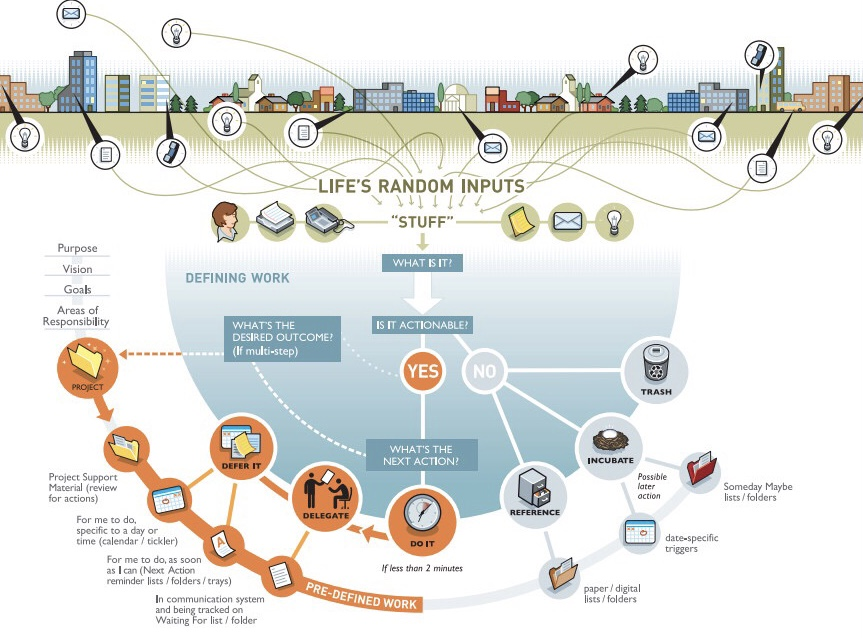
As a consultant, every minute that I spend on my own Internet marketing is a minute that I can’t bill to a client, therefore, I’ve had to force myself to become pretty efficient about how I do things like process e-mail, consumer information and published to the Internet. My constant inspiration in this process has been David Allen’s classic work ‘Getting Things Done‘. I recommend it to anyone who will listen. The heart and soul of David Allen’s book is this diagram:
How I apply Getting Things Done [GTD] to social media and ‘thought leadership’ marketing…

Thanks to David’s methodology I use as many containers as I need and not one more. I usually handle information only once — especially if I can process it in 2 min. or less. Here’s an attempt to depict what my thought leadership process looks like:

If you’re looking for a way to become more efficient about how you develop and document your expertise, comment below or use the contact form to get in such. I’d love to talk with you about applying David Allen’s Getting Things Done [GTD] principles to your world…

Go back

Your message has been sent

Warning
Warning
Warning
Warning.

How to Create, Keep, and Grow More Time

“Time, why do you punish me? Like a wave crashing into the shore, you wash away my dreams.” Hootie and the Blowfish

I remember listening to this song for the first time, circa 1995, and thinking to myself, “What garbage.”  Wasted time, at least for me as an undergrad, didn’t really mean that much at the time.  I don’t really know the exact moment that time became precious, but it seemed to happen overnight.  In one instant, that which was plenty all of a sudden became scarce.  Work, family, friends, and that little selfish individual inside were all conveniently requesting a share.  In a second, I was left with just an empty pie tray and no pie. Hootie’s words came ringing in my ear, “An hour only lasts for one second, one second”…damn them!!!  I decided that I will respect time and make it a friend.  After much thought and meditation, I began exploring all things productivity. Continue reading “How to Create, Keep, and Grow More Time”

Going back to our Getting Things Done [GTD] decision diagram for a minute…

The in basket I’m using more often than not is Google Reader. When I see ‘actionable’ content, I decide where is the best place to share that content using the following diagram:

I focused in an earlier post about sharing via Twylah and other tools — today the focus is on curation and blogging as a means of Getting Things Done [GTD]…

How do I decide that something is bloggable? Well here are some guidelines that I use…

  • When I come across content that is so brilliant that I could have written it myself if I would only take the time. Seriously, when I come across really good content that I want to expound upon and call out to my clients and readers…
  • When I find a great illustration or infographic
  • When I find a great YouTube video
  • When commenting on this content gives me a change to share something about my brand by agreeing, disagreeing, adding or subtracting…

You get the idea, right? Anything I find on the Internet is fair game as long as I remember to do three things:

  • Block quote and indent the content I am curating
  • Provide a link back to the original source
  • Be ready to move the content if requested by the owner

I firmly believe that when you curate effectively everybody wins. The original author gives exposure to my readers. My readers get a different perspective. Finally, my post is easier to write and I get the Search Engine Optimization [SEO] benefits from the content I curate…

Here are some thoughts from Suzanne Bird-Harris and a few others on the rationale for curation and some ideas on how to structure a curative post along with a screencast on how I do it using Windows Live Writer, a free blog editor from Microsoft…

Personally? I think curation is one of the best ways to supplement the original thinking on my blog. Here are some thoughts on curation in the blogging process…

Personally? I think curation is one of the best ways to supplement the original thinking on my blog. Here are some thoughts on curation in the blogging process…

Personally? I think curation is one of the best ways to supplement the original thinking on my blog. Here are some thoughts on curation in the blogging process…

http://storify.com/e1evation/thoughts-on-getting-things-done-gtd-in-curation

Here’s the diagram from the video…

David Allen on How to Fix Your Life

English: David Allen, creator of the Getting T...

One of my favorite clients sent me an article from one of my favorite writers [James Fallows, Free Flight, et al] about my favorite productivity thinker David Allen and I share it with you here. Fallows writes:

As I mentioned… I’ve been writing about and learning from the productivity expert David Allen for nearly a decade. Eight years ago, I wrote a profile of him for the magazine. In our newest issue I have highlights from a conversation I had with him, about coping with the modern nightmare of email and all-hours connectedness.

Source: David Allen on How to Fix Your Life – James Fallows – The Atlantic

Here are some highlights from the article online…

Everybody’s going to top out at some point, where your psyche just can’t manage any more. I was just reading that J. S. Bach had 20 kids. People complain now, “I’m so busy with the kids.” Okay, have 20 kids and see what happens. If you’re a musician or a writer, you could always be doing more work. So I don’t know that it’s ever been different for someone with an open-ended profession or interest.

So again, back to my general philosophy, [which] is: look, make as few plans as you can, capture every single thing that is potentially meaningful, and make sure you’ve got the appropriate maps to be able to know where to focus. It’s always been true about GTD, but I think [you need] a way to be able to see: How do you set priorities about all this stuff? Well, you need maps. You need maps to orient yourself. You need a map that says “Hey, in the next three years, what’s coming toward me that I need to be aware of?” “In the next three minutes, what’s coming toward me?” Those are different maps. By the way, you know, a “map” would be any list that you have that orients you: “Here’s my whatever-it-is project.” That’s a map. Obviously your calendar is a map. So having all the potentially relevant data determined so you can populate your appropriate maps and then spread out [in] your map room and say “Okay, what do I need to look at right now?” So the ability to be able to decide what needs to go on what map and then building the behaviors to make sure that you’re then negotiating with those maps appropriately.

What’s different these days? Nothing is different really, except how frequently this occurs. You and I have gotten more change-producing and priority-shifting inputs in the past 72 hours than your parents got in a month, some of them in a year. I was reading that in 1912, someone was complaining about the telephone, exactly the same things you hear people say about e-mail: “Oh my God, it’s going to ruin our quality of life”; “conversations are going to become surface-only and not meaningful”; “all the interruptions and distractions!” It reads like right now. I am hearing the same things I did when I first got into these issues, at Lockheed in 1983. In those days, if you even had a pocket Day-Timer, you were considered something of a productivity geek. The difference is that rather than a small minority of people experiencing this stress, it’s a much larger group of people, at every level.

Allen is brilliant and Fallows captures him at his best! Read the full story and then go back and consider how to apply Getting Things Done [GTD] to your internet tasks as I have outlined in this ongoing series! You might also enjoy this audio interview I did with David Allen several years ago

Full story at: David Allen on How to Fix Your Life – James Fallows – The Atlantic

The Tools David Allen Uses to Get Things Done


Lifehacker curated this story from The Atlantic:

GTD guru David Allen recently spoke in an interview with The Atlantic about all the things that keep him organized and productive. He uses a combination of low-tech tools and digital applications to accomplish what he says is the number one thing people need to do to gain control over their lives: “externalize” all the stuff thats coming in.” Full story at:The Tools David Allen Uses to Get Things Done.

Go to the source if you’re interested in David Allen’s approach…

Me? Here’s my list of GTD tools. Almost all electronic and besides the hardware, free or freemium and completely cross platform:

[listly id=”25l” layout=”full”]

I’m always trying to explain things in a way that is as simple as possible but no simpler, so I thought of another way to take a pass at David Allen’s Getting Things Done [GTD] principles as applied to the curation process. Here is the workflow map:

Here is how I apply it to the curation process:


Now, let me talk you through it:

Here are the two posts I mentioned in the screencast:

Over at Lifehacker today, they’re talking about the Dark Side of Getting Things Done [GTD] but here at e1evation, llc, it’s all rainbows and unicorns and we’re talking about how to apply Getting Things Done [GTD] to the curation process…

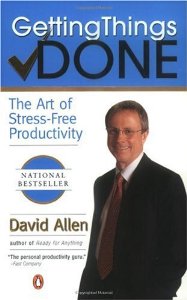
Now if you haven’t read David Allen’s classic productivity work, this would be a great weekend to do it. You can click the image to the right in order to purchase and download a copy to your Kindle or Kindle software immediately. I like to repost he Getting Things Done [GTD] workflow diagram as a reminder of the options…

…in this screencast we’ll be using Google Reader as the ‘in basket’ and the ‘stuff’ we’ll be processing is the articles that come from our trusted sources. We’ll be using Twylah and Power Tweeting to process our actionable items. Give it a view…

Why Twylah?

Questions? Feedback? Want to apply Getting Things Done [GTD] to your curation process? Use the form below or connect with me in social media…

[ contact-form] [contact-field class="zem_slink" title="Record label" href="http://en.wikipedia.org/wiki/Record_label" rel="wikipedia" target="_blank">label</a>="Name" type="name" required="true" label="Name"/] [contact-field label="Email" type="email" required="true"/] [contact-field label="Website" type="url"/] [contact-field label="Comment" type="textarea" required="true"/] [/contact-form]

Good stuff, David. I’m doing a series on Getting Things Done [GTD] on the internet. Coincidentally, I wrote about Email last week here: http://e1evation.com/2012/10/05/getting-things-done-gtd-in-email/

Live & Learn's avatarLive & Learn

PrintI’m productive. Efficient. I’ve been told by many – obsessively productive and efficient.  I chew up tasks and spit them out.  Yet, one can always be more productive, right?  I’ve been in a life long search for the Holy Grail of a Zero Email Box solution at the end of each day.  A search for the best To-Do program.  A hunt for a better way to manage projects. A race to squeeze more into each day.  I believe being more productive is possible. Within reach.  Just within the ends of my fingertips.

So, when I came across Robin Sharma’s post titled “Become The Most Productive Person You Know”, I was like Zeke on his bone – on it.   When Sharma opened his post by stating: “I want to help you create explosive productivity so you get big things done (and make your life matter)…”, I was giddy. …

View original post 1,359 more words

Getting Things Done [GTD] on the Internet…

Today I’m announcing an epic series called Getting Things Done [GTD] on the Internet. Every Friday for the foreseeable future I will post on some aspect of applying David Allen’s classic work “Getting Things Done” to the basics of Internet marketing…

I’d like to start by thanking those of you who have not read David Allen’s book — you have given me a competitive advantage for years! Seriously, though, I’m continually surprised at how many people have not read this classic work. For me, it ranks among the three best business books I’ve ever read. It’s right up there with the seven habits of highly effective people and that is saying a lot for me. In fact, I think these two books go together like peanut butter and chocolate; Stephen Covey‘s book provides a strategic framework on David Allen’s book gives great insight on how to implement Covey’s framework…

Allen says:

THE CORE PROCESS I teach for mastering the art of relaxed and controlled knowledge work is a five-stage method for managing workflow. No matter what the setting, there are five discrete stages that we go through as we deal with our work. We (1) collect things that command our attention; (2) process what they mean and what to do about them; and (3) organize the results, which we (4) review as options for what we choose to (5) do. This constitutes the management of the “horizontal” aspect of our lives—incorporating everything that has our attention at any time.

Allen, David (2002-12-31). Getting Things Done: The Art of Stress-Free Productivity (p. 24). Penguin. Kindle Edition.

In my practice, my emphasis is on what I call “practical, tactical social media“. Chapter 2 of Allen’s book gave me a tool that I apply in multiple was to the social media process…


In the next couple of weeks, I’ll be talking about how to apply this diagram to everything from email to social media management, including…

  • Getting Things Done with Gmail, Google Apps and Google Tasks…
  • Getting Things Done with Google Reader for ‘Personal News Aggregation‘…
  • Getting Things Done with WordPress for Business Blogging…
  • Getting Things Done with Twitter for social media…
  • Getting Things Done with social media management…

I’ll also entertain ‘how would I apply Getting Things Done [GTD] to ________’ kind of questions if you have one you’d like to ask. I’ll share theses posts each Friday so you can ponder them and implement the parts you like over the weekend so stop by next Friday for Getting Things Done with Gmail, Google Apps and Google Tasks…

How to do an Ultimate GTD Weekly Review

Cover of "Getting Things Done: The Art of...

Lifehacker is offering courses online; today they tackle the Getting Things Done weekly review:

You are only as good as your GTD system.

In the Getting Things Done system, without a solid weekly review, your productivity will not be at an optimum level. The weekly review is one of the most overlooked aspect of GTD, mostly because it seems to take too much time or may seem “overboard”. The fact is the GTD weekly review is essential to get more done with relaxed control.

In this Lifehack Lesson you will learn how to do one of the most thorough weekly reviews that will boost your productivity and get you one step closer to having a “mind like water”. Get the course here: How to do an Ultimate GTD Weekly Review.

If you’re not familiar with David Allen’s classic work on ‘Getting Things Done’ I strongly encourage you to look into his system!

Jeg har mistet min vei

Don’t worry! If you’re looking for Todd Lohenry, you’re in the right place — I’ve just made a few changes to get myself back on track!

For me birthdays are a time of reflection and this year was no exception; I spent a lot of time thinking about this blog and what it isn’t trying to accomplish here and here is my conclusion: I was a foreign language major in college and one semester I took a little Norwegian. One of the phrases I remember after 30 years is “I’m lost” — Jeg har mistet min vei. Point? Focus. I lost mine on this blog and it is affecting my life in other areas and draining resources from other important projects so I’m going through the same process for myself that I would do with any client — in other words, I’m going to eat my own dog food and sharpen my focus.

Backstory: I started blogging with Google’s blogger over seven years ago. Three years later I moved to WordPress. Throughout that seven years my personal blog has been a place to practice my blogging skills while sharing personal or non-business thoughts. Until 2008 I was very involved in the political process and earlier posts will reflect that. Now my focus has shifted from divisive politics to compassionate communication around Celebrate Recovery and the things that I have learned through that program. This blog is a way of working my “12th Step” by sharing the good things I find along the way and I am changing the name to reflect that sharpened focus.

The universe provided a great reminder this morning — a quote from David Allen in a post from Ciara Conlon on the Lifehacker blog which I curated here but the image is worth repeating…

My WordPress username is kingofcuration and there’s a good reason for that; in my consultancy I have developed a very efficient workflow for thought leadership marketing — kind of a “lather, rinse, repeat” cycle called the ‘e1evation workflow‘ — but just because I can do this better and faster than most people doesn’t mean I should. My focus should and must be my business, my business blog and applying the workflow to that process. Perhaps even more important at the moment is the book I am writing about thought leadership marketing which I must finish this month…

I don’t want to fall into this trap!

Questions? Feedback?

Peter Bregman posted this at Psychology Today

I’ve come to the conclusion that I use email to distract myself. Whenever I feel the least bit uneasy, I check my email. Stuck while writing an article? Bored on a phone call? Standing in an elevator, frustrated in a meeting, anxious about an interaction? Might as well check email. It’s an ever-present, easy-access way to avoid my feelings of discomfort.

What makes it so compelling is that it’s so compelling. I wonder what’s waiting for me in my inbox? It’s scintillating.

It also feels legitimate, even responsible. I’m working. I need to make sure I don’t miss an important message or fail to respond in a timely fashion.

But it’s become a serious problem. When we don’t control our email habit, we are controlled by it. Everyone I know complains about email overload.

Email pours in, with no break to its flow. And like addicts, we check it incessantly, drawing ourselves away from meetings, conversations, personal time, or whatever is right in front of us.

Source: Coping With Email Overload | Psychology Today

Go to the source if you’d like to read the rest of his thoughts. I’d like to share with you a way that I have found to control my email habit…

Tools without thought or tactics are worthless so I try to remind myself that email is best used as a tool for ‘just in time’ information – information that affects relationships and revenue. All your ‘just in case’ information belongs in a virtual newspaper like Google Reader. Think of how much lighter your email load would be if you didn’t let newsletters and other detritus in? How often have you started down the path to Inbox Zero and then been waylaid by a Victoria’s Secret or Cabella’s catalog in your inbox. There’s a time and a place for that; the time is your ‘personal news aggregation’ time and the place is Google Reader. My advice? Use Gmail for email with a touch of Merlin Mann’s Inbox Zero and David Allen’s ‘Getting Things Done’ and you’ll be an INBOX HERO in no time!

If you’re looking for help in this area, try my online book on ‘personal news aggregation’ or how to create your own personal news agency. You can register free at http://elevation.company/pna. Here are two recent lunch and learns I did on the topic of Gmail and Google Reader as well…

How to be an ‘Inbox Hero’ with Gmail…
http://youtu.be/hq5yksbplhE

How to be a Google Reader Rockstar…
http://youtu.be/6E-sP2kCf5I

Email Is Not Broken; We Are

Gmail logo

Here’s an interesting perspective on the ‘problem’ of email…

There’s a constant flow of “email is/is not broken” articles across the internet, but most of them miss the point. Email as a system is not broken, but we, through our email behaviors, are.

Nearly all of the articles written recently about fixing email have concentrated on technology and building a better client or implementing the specs more closely or bringing two systems together. These are all great ideas and have a ton of value, but they will not fix the inherent issue that people are experiencing with email, but which most articles fail to articulate: we think email is broken because we are overwhelmed by it and get less real work done because of it.

So instead of asking how we can make email better/faster/cooler, we need to ask ourselves how we can get more work done while still using email. Unfortunately, many experiences have shown over the past decade or so that this problem is not easily solved by new technology, as much as I would love that. It is solved by teaching people better email behaviors. This is certainly a less sexy solution, but guess what? It’s the attainable one. Here are some ideas that I’ve come across from others, and that warrant further investigation. They are all designed to help us get more real work done, which is the real problem with the email timesink.

Source: Email Is Not Broken; We Are

You can go to the source and read the author’s perspective, but while you’re here consider this: I think email is ‘broken’ because we let the wrong things in to begin with — in other words, we have no one to blame but ourselves. Most peoples’ inboxes are like their kitchen junk drawers – how can they expect to find anything of value in there? Instead, try using email only for ‘just in case’ information – information that affects relationships and revenue and all that goes along with it – and use an rss reader like Google Reader for all the ‘just in case’ info. That philosophy alone will make your email infinitely more manageable! As you get more efficient, you can add David Allen’s ‘Getting Things Done‘ principles to your approach…

If you’re looking for more ideas like this, check out my free ebook on ‘personal news aggregation’. Go to http://elevation.company/pna/ and click the register button. You might also be interested in this recent post I did on effectively consuming information

Enhanced by Zemanta

Fifty ways to boost your productivity

Category:Educational research

Nicholas Bate shares his 50 ways to boost productivity

  1. Don’t hold stuff in your head.
  2. Keep your head clear and use your head for thinking: decisive, critical, imaginative.
  3. Use paper/screen for ‘holding’ your list of what needs attention.
  4. Our greatest asset is where we place our attention.  Bear in mind we live in an exciting world where our attention is constantly ‘pulled’ to another place.
  5. To be productive is to maintain attention on what is important in the face of continuous distraction.
  6. And what needs attention is not just urgent, but what is important and thus often apparently not urgent e.g. health.
  7. Thus: ask what is important?
  8. Firstly by referencing the compass points of your life….
  9. Thus: your business/career
  10. Thus: your health
  11. Thus: your relationships
  12. Thus: your finances
  13. Capture these on you attention list.
  14. Secondly by stretching your planning horizon…
  15. Every day, ask what’s important tomorrow?
  16. Every week, ask what’s important next week?
  17. Every month, ask what’s important next month?
  18. Every quarter, ask what’s important next quarter?
  19. Every year, ask what’s important next year?
  20. Capture these to on your attention list.
  21. And finally anything which is burning and urgent; add these to your list.
  22. But the more you do 8 and 14 above…
  23. The fewer will be generated by  21.
  24. Every end-of-the-working-day review your list and decide what does need attention: create your daily list.
  25. Don’t try and do everything…

via Fifty Ways To Boost Your Productivity – Nicholas Bate.

Follow the ‘via’ link above if you’d like the remaining 25 ways. Before you go, however, I’d like to call your attention to a post and a couple of screencasts I’ve done on a tool called Evernote that I use in conjunction with a ‘philosophy’ called Getting Things Done [GTD] to help implement Nicholas’ first 6 ways…

http://youtu.be/_vaGNnCuc4s
http://youtu.be/Py-X0GIlRrU
http://youtu.be/e4ySRRUB_8I

Decluttering your mental clutter

Minimalist Mac OS X Desktop

Good stuff from Ryan Nicodemus at The Minimalists

Those voices inside your head won’t be quiet. All you can hear is your boss telling you to have those reports done by Friday or your daughter reminding you that there’s soccer practice this Saturday or a parent’s voice telling you that they’re going to need you to help them drop off their car at the mechanic’s.

Most of us have somewhere to be each day, not to mention the everyday fire drills we get put through at work or at home. It can feel very overwhelming, and our minds can get noisy. Some of us even have echoes of voices from experiences of many years ago.

How do you deal with all of that internal mental clutter?

Mental clutter is something I’ve worked on my entire life. I used to feel like, no matter what, I constantly had some sort of mental clutter—I always had something going on in my mind. If it wasn’t something new causing that anxious cluttered feeling, it was something from the past creeping back into the present to haunt me. Some days were worse than others, but it was there every day.

And then, after fixing several other parts of my life, I was able to cut down on the mental clutter…

Source: The Minimalists | Decluttering Your Mental Clutter

Go to the source if you want to know more about the parts Ryan fixed. Me? I am a huge fan of David Allen and his “Getting Things Done” principles and I use a tool called Evernote to get things out of my head and into a foolproof system where I will never lose them. You can read my take on these ideas over at my business blog…

Related articles from http://e1evation.com

Want to experience peace of mind? Blogger David Kanigan and I both advocate learning Getting Things Done [GTD] principles and tools to help accomplish that objective. Follow the ‘reblogged’ link to read his post…

Live & Learn's avatarLive & Learn

From David Allen, author of Getting Things Done, Productive Living, March 2012:

“If you want to have the feeling of freedom regularly, you’ve got to get used to it. Literally.

What’s the greatest obstacle to living in the relaxed state of mind that is possible with the methods I coach? People simply aren’t used to it. Anything your nervous system experiences as unique or unusual will likely be “rejected” unconsciously in short order, because it is not in the comfort zone.

People are more comfortable being uncomfortable than being comfortable, if they have been uncomfortable for an extended period of time. It’s simply an ingrained pattern, and familiarity is more comfortable than novelty. Most people have for so long experienced the gnawing sense of anxiety about all the un-captured and un-clarified “work” of their life, that’s what they’re used to. Then, no matter how clean and in control they…

View original post 224 more words

Česky: Toto je ikona pro sociální síť. Je souč...

I’m a huge fan of Evernote and it seems recently that almost every day I find another reason to love it. Perhaps the most important reason lately is that it fits nicely into my Getting Things Done [GTD] world and is a massive productivity booster. Evernote is my über-container — everything goes in there! Why? Because Evernote syncs with every device I own and it’s searchable so the important things I need to have at my finger tips are there when I need them…

In the past couple of days I have added important emails, pictures, audio notes, web clips, pdfs, Word docs and presentations. I have added them via their web clipper, Shareaholic, email, Twitter and a folder on my desktop that syncs everything to Evernote. It seems there is no end to the clever ways I can get content in. Not only can I search Evernote for the things I’ve stored there, but I can share the things I’ve saved via email, Twitter or Facebook. It just rocks for the things I need it to do!

I’ve posted a list of my top 5 productivity tools along with a couple of good books and other suggestions below, but those are just the ingredients. Here’s my recipe:

First, I read David Allen’s classic productivity book Getting Things Done annually and refer to it often. Buy it using Kindle software so you can search it or mark it. Why do I do this first? Because in my world, tools without a purpose are useless…

I use…

  • Gmail to manage ‘just in time’ information; information that affects relationships or revenue. If there’s a task, I add it to the built in Google Tasks. If there’s information I need to hold on to, I send it via email to my secret Evernote email address. I use Getting Things Done [GTD] principles combined with Gmail’s features to practice ‘inbox zero’ and cut through my email like a proverbial ‘hot knife through butter’!
  • Google Reader to manage ‘just in case’ information. The things I need to read to deepen my expertise.
  • I use Gist to track the important people in my world and what they are publishing [Gist is much better than Google Reader at tracking output from people!]
  • I use Google Tasks and apply Getting Things Done [GTD] principles to my task lists.
  • Finally, I used my beloved Evernote as the one über-container to keep it all together.

As I’m writing, I’m telling myself I need to put together a screencast on this topic as so many people are struggling to manage their information. What do you think? Is this interesting enough a topic to you?

Here are the ingredients I promised you…

These are my killer productivity thoughts, tools and tactics…

These are my killer productivity thoughts, tools and tactics…

These are my killer productivity thoughts, tools and tactics…

These are my killer productivity thoughts, tools and tactics…

These are my killer productivity thoughts, tools and tactics…

http://storify.com/e1evation/dollar-15-88-toward-a-more-productive-you

Enhanced by Zemanta

Cover of "Getting Things Done: The Art of...
Cover via Amazon

I maintain that ‘how do I add content marketing to my plate and still get home for supper?’ is one of the most pressing issues in social media today. The pundits all say that this is the year for curation and content marketing but not a lot of experts are giving direction to thought leaders who hope to execute such a strategy effectively. In this 11 minute video I explore the use of David Allen’s ‘Getting Things Done‘ principles to content marketing…

http://www.youtube.com/watch?v=J-0UlkmVB0M&feature=youtu.be

Questions? Feedback? Please comment below…

Enhanced by Zemanta

Feed-icon
Image via Wikipedia

Here’s a post on one of my favorite topics. Save your inbox for ‘just in time’ information by sending all your ‘just in case’ information to your newsfeed reader…

“If you’re feeling overwhelmed with the sheer volume of email messages that hit your Inbox daily, try these new ideas that may help reduce your overall email burden without interrupting the incoming flow of information. 

You may also want to check out Getting Email Under Control – a PDF ebook from David Allen where talks about tackling email using the the Getting Things Done methodology.” Source: How to Manage Email Overload with some help of your RSS Reader

I’ve done a 30 minute training session on how to use Google Reader and you can view it here. Give me a call at (920) 486-4798 or drop me a note using the contact from if you’d like to know more…

Does this sound familiar?

“I routinely declare email bankruptcy and simply delete my entire inbox. But even so, I currently have 2,433 unread emails in my inbox. Plus another 721 in my Facebook inbox. and about thirty skype message windows open with unanswered messages. It goes without saying, of course, that my cell phone voicemail box is also full (I like the fact that new messages can’t be left there, so I have little incentive to clear it out).

How do I deal with email now? I scan the from and subject fields for high payoff messages. People I know who don’t waste my time, or who I have a genuine friendship with. Or descriptive subject lines that help me understand that I should allot a minute or more of my life to opening it and reading it.”

Wow. Talk about a dysfunctional way of handling communications! Are you having problems like this? Here are a couple of ideas…

  1. Use Gmail. No other ISP offers the tools to handle large volumes of email like Gmail…
  2. Read ‘Getting Things Done’ by David Allen. If you’re in a hurry, skip to #3…
  3. Check out Inbox Zero

If you can’t implement it on your own, scroll down and give me a call — I’ll be happy to help you out…

Reblog this post [with Zemanta]

Start a Blog at WordPress.com.

Up ↑