Happy Independence Day!!!
Happy Independence Day!!!
http://storify.com/e1evation/just-in-case-you-missed-this-for-7-4-2012
Thinks I find along the way
Happy Independence Day!!!
Happy Independence Day!!!
http://storify.com/e1evation/just-in-case-you-missed-this-for-7-4-2012
Our best to you each morning!
Our best to you each morning!
http://storify.com/e1evation/just-in-case-you-missed-this-for-7-3-2012
I’m posting at e1evation.net now! Go there for the latest updates…
http://storify.com/e1evation/just-in-case-you-missed-this-for-6-27-2012
Learn how to be a Google Reader rockstar! Join a free hangout at 15:00 CDST [GMT-6] today. Just add me to one of your circles and I’ll add you back and invite you…
I can talk about any aspect of this Google Reader mindmap you’re interested in!


<script src="
Good stuff I found over the weekend…
http://storify.com/e1evation/just-in-case-you-missed-this-for-5-29-2012.js”>%5B<a href="
Good stuff I found over the weekend…
http://storify.com/e1evation/just-in-case-you-missed-this-for-5-29-2012″ target=”_blank”>View the story “Just in case you missed this for 5/29/2012” on Storify]
Storified by Todd Lohenry · Tue, May 29 2012 11:08:03
e1evation, llc is pleased to have been chosen to design the new blogging home of DX3 Canada — the place where Canadian business gets digital. Click the image to go to the site…

…are greatly exaggerated as Mark Twain once said…
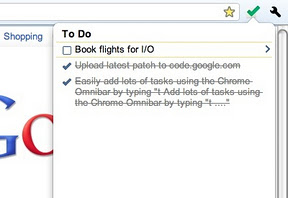
Chrome Web Store – Google Tasks (by Google)
Easily add and manage your tasks from Chrome in one of three ways:
- Simply type “t Your new task” into the Chrome Omnibar to easily add a task from whatever web page you’re on.
- Click the Tasks icon to add a task, see your tasks and task lists and mark a task as completed
- Highlight text on any web page, right click and add that text to a new task.
Tasks are visible everywhere that you can see your Google Tasks – in Gmail, Calendar, iGoogle, Mobile and via the Google Tasks API.
This extension has been released as an example of the Google Tasks API, and can be viewed and contributed to at https://code.google.com/p/google-tasks-chrome-extension
Please note that if you sign into multiple Google accounts you should ensure that the first account you sign into is the account you wish to use when managing Tasks via this extension.
Get some!!!

Here’s an interesting perspective on the ‘problem’ of email…
There’s a constant flow of “email is/is not broken” articles across the internet, but most of them miss the point. Email as a system is not broken, but we, through our email behaviors, are.
Nearly all of the articles written recently about fixing email have concentrated on technology and building a better client or implementing the specs more closely or bringing two systems together. These are all great ideas and have a ton of value, but they will not fix the inherent issue that people are experiencing with email, but which most articles fail to articulate: we think email is broken because we are overwhelmed by it and get less real work done because of it.
So instead of asking how we can make email better/faster/cooler, we need to ask ourselves how we can get more work done while still using email. Unfortunately, many experiences have shown over the past decade or so that this problem is not easily solved by new technology, as much as I would love that. It is solved by teaching people better email behaviors. This is certainly a less sexy solution, but guess what? It’s the attainable one. Here are some ideas that I’ve come across from others, and that warrant further investigation. They are all designed to help us get more real work done, which is the real problem with the email timesink.
Source: Email Is Not Broken; We Are
You can go to the source and read the author’s perspective, but while you’re here consider this: I think email is ‘broken’ because we let the wrong things in to begin with — in other words, we have no one to blame but ourselves. Most peoples’ inboxes are like their kitchen junk drawers – how can they expect to find anything of value in there? Instead, try using email only for ‘just in case’ information – information that affects relationships and revenue and all that goes along with it – and use an rss reader like Google Reader for all the ‘just in case’ info. That philosophy alone will make your email infinitely more manageable! As you get more efficient, you can add David Allen’s ‘Getting Things Done‘ principles to your approach…
If you’re looking for more ideas like this, check out my free ebook on ‘personal news aggregation’. Go to http://elevation.company/pna/ and click the register button. You might also be interested in this recent post I did on effectively consuming information…

Just got the signoff on a new site launch for new client Philip Auerswald of George Mason University and the Kauffman Foundation. His new book The Coming Prosperity is out today and we worked hard together to move his site from Blogger to WordPress and implement this Pinterest-style theme from Shaken & Stirred. Click the image to check out Philip’s new site and while you’re there, be sure to buy the book! :-D


Last Wednesday we began a series of ‘lunch and learn’ presentations at The Docking Station in Green Bay, WI and I am pleased to share it [almost] in its entirety below. This is the first in a series of ongoing presentations on the topic of thought leadership marketing which will be published in a book called “Be Known” on July 8, 2012.
Why start with Gmail? The answer to me is obvious; if you can’t manage your e-mail how can you be proactive in social media? Personally I don’t believe that you can ever get ahead as long as you are a victim of your inbox…
I have outlined my thoughts on these topics in previous e-book called ‘personal news aggregation‘ which is free for the registration here. Just click on the word registration, supply a username and e-mail address and you will immediately gain free access. If you want to be a thought leader you have to be able to manage the content you need so that you can become and be known as the expert. The journey starts in your inbox!

Yup, Evernote again. I talked about it a little while ago here and here. This time a pastor buddy of mine caught me preaching a sermon on the glories of Evernote and he challenged me to create a longer tutorial than I have done in the past. Here it is: all 16:34 minutes of Evernote from beginning to end. If you don’t love Evernote after you watch this, please tell me why in the comments…
If Gmail is so easy, why do people still have hundreds — thousands — of unread emails in their inboxes? In part it’s because technology without good thinking and tactics means nothing…
I teach my students that email should be for ‘just in time’ information — information that affects relationships and revenue. Everything else belongs in Google Reader! My friend Dana VanDen Heuvel of The Docking Station talked me into revealing my secrets for effective email handling at an event that happens next week. Here’s Dana’s press release…
“The Docking Station, Green Bay’s first Coworking space, is inviting business professionals to take back their Inbox and attend a free course on how to master Gmail to be more effective and efficient.
“An overwhelming inbox decreases efficiency and productivity,” said Dana VanDen Heuvel, co-owner of The Docking Station. “There are quick and easy solutions to manage your email and make it work for you. A lot of people dread opening their email. This course will help alleviate email stress and make your inbox about creating relationships and bringing in revenue.”
The Gmail course will be taught by Todd Lohenry, owner of e1evation, llc, an international consulting firm that has been educating and empowering business owners and professionals for the past 7 years. “I spent two hours with Todd that will save me at least a gazillion hours. His patient coaching and time-saving processes helped me get to an inbox of zero that same day,” said Carrie Klassen, Creative Director for Pink Elephant Academy for Entrepreneurs.
The Gmail course is part of a series of free events that The Docking Station hosts as part of their mission of being an educational resource to the entrepreneur community. “Our hope is to bring professionals together and connect them to thought leaders and resources that can help them increase productivity and grow their business,” said VanDen Heuvel.
The Docking Station is one of approximately three hundred Coworking spaces in the United States that is redefining the way independent professional work. It was founded by small business owners and entrepreneurs Dana VanDen Heuvel of The MarketingSavant Group and Peter Nugent of Enlighten Financial, LLC. The Docking Station is located at 111 S. Broadway in Downtown Green Bay. To register for the Gmail course, go to http://www.thedockingstation.net/events/ or for more information call The Docking Station at (920) 644-3625.”
If you can’t make it to Green Bay, try my ebook — you can find it online at http://elevation.company/pna. Just click the register link, provide a name and email address and you’ll be on your way to a more productive tomorrow…
It’s hard to imagine the Apple I worked for in 1996-1999 is this Apple…
Let’s face it: Apple is rich. So rich it could send a crowd of people to the moon to build a luxury hotel and hang out there for a few years. Here’s what else it could do, according to our friends at The Joy of Tech.
It’s not surprising Apple is so deeply awash in cash, especially after its spectacular first-quarter earnings announced this week. You can see the details of Apple’s unbelievable numbers here, but will give you a highlight: the company’s revenues for the quarter were higher than its total revenues for all of fiscal 2009.
Apple’s so rich, it could give each of its employees a check for $6,622,516. The company’s worth more than $400 billion. Here’s more about Apple’s riches.
If you had $100 billion (or $97.7 billion in cash reserves, to be exact), what would you do with it?
Source: What Apple Could Do With Its $100 Billion Cash Hoard [COMIC]

Yet in Steve Jobs epic biography it says:
This ability to focus saved Apple. In his first year back, Jobs laid off more than three thousand people, which salvaged the company’s balance sheet. For the fiscal year that ended when Jobs became interim CEO in September 1997, Apple lost $1.04 billion. “We were less than ninety days from being insolvent,” he recalled. At the January 1998 San Francisco Macworld, Jobs took the stage where Amelio had bombed a year earlier. He sported a full beard and a leather jacket as he touted the new product strategy. And for the first time he ended the presentation with a phrase that he would make his signature coda: “Oh, and one more thing . . .” This time the “one more thing” was “Think Profit.” When he said those words, the crowd erupted in applause. After two years of staggering losses, Apple had enjoyed a profitable quarter, making $45 million. For the full fiscal year of 1998, it would turn in a $309 million profit. Jobs was back, and so was Apple.
Isaacson, Walter (2011-10-24). Steve Jobs (p. 339). Simon & Schuster, Inc.. Kindle Edition.
I was laid off by Apple not once, but twice – the first time in this round. Both times my wife was 8 months pregnant. But I came back because I was changing the world one computer at a time. And I got laid off again…
Lately, the poor working conditions at Foxconn have come to light again and it’s a sad story indeed. However, if it hadn’t been for the Apple employees of my era none of this would be here. None of it. Make my check out to e1evation, llc…
The ‘friday the 13th’ edition…
The ‘friday the 13th’ edition…


 Bright, shiny objects!
You must be logged in to post a comment.