The WordPress.com Reader: Follow Your Feeds, Discover Great Reads

This is a very powerful feature that many people overlook. WordPress.com is not only a great publishing platform, but it can be a great source of content as well. Look into it…

Cheri Lucas Rowlands's avatarWordPress.com News

As you may have heard, Google Reader is shutting down on July 1. As readers ourselves, we understand the importance of a go-to space on the internet for your daily feeds and regular reads — and a place to discover new finds. If you’re looking for a new reader (or are not using it already), we hope you’ll take the WordPress.com Reader for a spin. Check out what you can do:

Import your subscriptions

The WordPress.com Reader can import and export OPML, so you can transfer subscriptions over from another feed reader. Google Reader users can import their subscriptions directly from Google Reader into the WordPress.com Reader. Visit the import page to get started:

Reader Import page

Google Reader users will be asked to select the appropriate Google account (or sign in with a different email address) and grant WordPress.com to access it. For those importing from another feed reader, click on Choose File and then…

View original post 274 more words
6 Ways To Save Yourself From Drowning In E-mails

I collect articles like this. Over the years I’ve seen hundreds of articles on email productivity but I’ve never seen anyone write about my favorite which is this:

Don’t give your email address to anyone with whom you don’t want to do business.

Just this one thing will guarantee that your email volume will drop by half. Maybe two thirds or even more.

I don’t care where you collect your personal emails, but your business inbox should be reserved for what I call ‘just in time’ emails — emails that affect relationships, revenue and reporting. Everything else belongs in a second, free email account or a news reader.

Of all the articles I’ve read on the topic, I think this is one of the more amusing conclusions I’ve read but that doesn’t mean the other ideas in it won’t help you.

One way you can cut out 90% of your email time is to hire a personal assistant (PA). These can be hired from outsourcing sites for a reasonable hourly rate. You can then train them by giving them access to your business email and then using a tool such as Skype to go through your email inbox every day for a week. After that, they can log into your email account every morning and only forward emails on to you that are absolutely vital for you to personally deal with.

So the only additional step you will need to take is to set up a different mailbox. If you receive personal emails, then it’s obviously advisable to steer them into your new email account rather than allowing your personal assistant to read them. Yes this will cost money, but a freelance personal assistant will potentially cost a fraction of the money you can make by freeing up several hours per day in some cases.

Go to the source: 6 Ways To Save Yourself From Drowning In E-mails.

How Can Businesses Build Trust?

As a marketing manager, I talk alot about becoming a ‘trusted source’ but what does that really mean? Consider this:

Putting in place a new settlement on trust will not be easy. It will take time, commitment, hard work and investment. It will require a new perspective on the relationship between business and society, the responsibility of corporations, and the norms that govern behavior. But we trust the effort will pay off.

Get the rest of the article here: How Can Businesses Build Trust? | Cynthia Hansen.

How to achieve instant peace of mind

My phone was driving me CRAZY this morning…

via How to achieve instant peace of mind – YouTube.

Is Your Smartphone Making You Dumb?

Hmmm.

Imagine that after a routine medical exam your doctor delivers some devastating news: Since your last checkup your cognitive performance has plummeted. Your ability to connect with others has eroded. And your memory for everyday events is no longer operating as it once did. As it turns out, there is a cure and it won’t cost you a penny. The treatment is simple. All that’s required is that you put away your smartphone. Few of us will have this conversation with our doctors. But perhaps we should. Over the last few years, scientists have begun studying the way cell phones affect the human experience. Early results are alarming.

via Is Your Smartphone Making You Dumb? | Psychology Today.

Two Screens Are Better Than One?

Is this still true? I think not in light of more recent research.

Microsoft researchers haven’t perfected the genie, but they’ve found a tool that can increase your productivity by 9 to 50 percent and make your work day easier. And you can begin using it right away. The researchers conducted user studies that proved the effectiveness of adding a second or even third monitor to your workstation, creating a wide-screen effect. In addition, they found out how the operating system needs to change to accommodate a larger screen area.

via Two Screens Are Better Than One – Microsoft Research.

In my personal path, I went from one, to two and even three monitors before returning to two and settling on a single 27″ monitor. You get some of the benefits of the ‘wide-screen’ effect without much of the productivity killing distraction.

A Focus on Distraction

Stunning, actually.

As economics students know, switching involves costs. But how much? When a consumer switches banks, or a company switches suppliers, it’s relatively easy to count the added expense of the hassle of change. When your brain is switching tasks, the cost is harder to quantify.

There have been a few efforts to do so: Gloria Mark of the University of California, Irvine, found that a typical office worker gets only 11 minutes between each interruption, while it takes an average of 25 minutes to return to the original task after an interruption. But there has been scant research on the quality of work done during these periods of rapid toggling.

We decided to investigate further, and asked Alessandro Acquisti, a professor of information technology, and the psychologist Eyal Peer at Carnegie Mellon to design an experiment to measure the brain power lost when someone is interrupted.

To simulate the pull of an expected cellphone call or e-mail, we had subjects sit in a lab and perform a standard cognitive skill test. In the experiment, 136 subjects were asked to read a short passage and answer questions about it. There were three groups of subjects; one merely completed the test. The other two were told they “might be contacted for further instructions” at any moment via instant message.

During an initial test, the second and third groups were interrupted twice. Then a second test was administered, but this time, only the second group was interrupted. The third group awaited an interruption that never came. Let’s call the three groups Control, Interrupted and On High Alert.

We expected the Interrupted group to make some mistakes, but the results were truly dismal, especially for those who think of themselves as multitaskers: during this first test, both interrupted groups answered correctly 20 percent less often than members of the control group.

via A Focus on Distraction – NYTimes.com.

Based on this information, is there really an advantage to having two monitors? I think not…

How to Provide Unique Value in Your Content

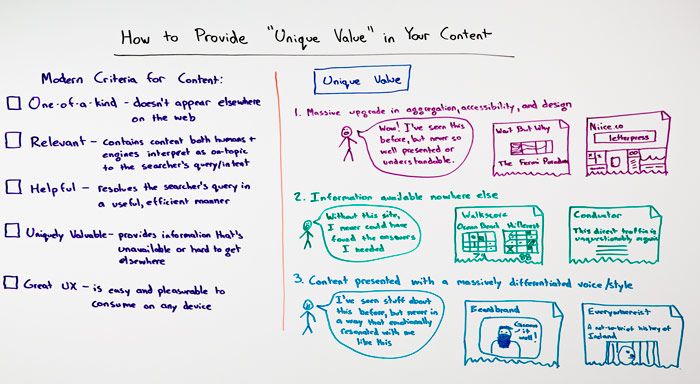
In today’s Whiteboard Friday, Rand Fishkin talks about what it means for content providers to offer ‘unique content’:

The challenge has been that I’ve seen a lot of people adopt this attitude around, yes, unique content, unique value, but merge those two and not view them as two different things and really not understand what I mean when I say unique value at all, and it’s not just me. A lot of the content marketing and SEO industries are talking about the need for unique value, and they may say other words to describe that. But unfortunately, as an industry, we’ve not yet coalesced around what that idea means, and so this Whiteboard Friday is to try and explain exactly what a lot of these best practices and experts are talking about when they say “unique value.”

Here’s the whiteboard. Go to the source for the explanation behind it!

rand

Source: How to Provide Unique Value in Your Content – Whiteboard Friday – Moz.

Make 2015 a Great Blogging Year

Do you have a blog? I do. Obviously. This about these things for 2015…

Getting Cybersecurity to Work isn’t Going to Work without Doing the Work

Earl Perkins has an interesting post on the Gartner Blog Network about the topic of security.

I thought it would be appropriate to start off 2015 by adding my voice to a rising chorus from advisors, consultants and others in the cybersecurity industry with a short and simple message. We as an industry cannot help you if you’re not willing to help yourselves. And helping yourselves means you have to do (at the very least) the minimum required to secure yourselves from the most common types of cybersecurity threats and attacks.

Now this may seem to be an obvious comment and you may be wondering “why is he wasting my time telling me this”. I’m taking the time to do so because frankly many of you do not appear to be listening. It may be time to be a bit more blunt and direct. There are and have been reams of research and guidance written and delivered over the years that outline the basic principles and practices to establish cybersecurity strategy, governance, planning, management and operations. Descriptions of these steps to core competence can be found not only in Gartner research but from many other sources. Establishing this core competence for many of you does not require large or expensive purchases of technology and services, nor does it require major shifts or changes in process or organization. But it DOES require a level of discipline, structure and cultural change regarding where cybersecurity fits within your organization and the priority that you give changes that must and should occur. This core competence does require a level of communication and awareness that is apparently not working in its current form of delivery. It requires a level of coordination with service providers, supply chain partners and external parties that does not appear to be taking place.

Get the rest of the article here: Getting Cybersecurity to Work isn’t Going to Work without Doing the Work.

Last summer, I read Michael J. Daugherty’s book “The Devil inside the Beltway” and I thought ‘Thank God I don’t have to deal with his issues’, however, I just took a position with a healthcare firm that must comply with HIPAA and HITTECH and as the Marketing Manager who is also involved in technology issues, there is nothing more important than cybersecurity — to ignore it is to risk losing your business!

In our case, we rely heavily on our partner Netgain in St. Cloud to ‘watch our six’ but there’s always the fear that someone could install LimeWire or its modern day equivalent and bring down the house a la LabMD. Every employee must understand that the technology they use is not theirs and that it’s provided to do a job and that they must comply with security requirements. Cybersecurity is the responsibility of EVERY employee…

No More Willpower? Watch This For Practical Productivity Tips

Here are some thoughts that might help you get out of that funk.

When you’re feeling unmotivated or unfocused, it can be hard to get things done. How do you get out of this kind of funk?

It’s more complicated than just trying to force yourself to “try harder.” Indeed, your willpower can only get you so far.

This video gives a few helpful tips that allow you to trick yourself into entering a more productive state of mind. Unlike other productivity tips, these ones are based on science (which makes them both way more interesting and more effective).

My favorite productivity hack is what they describe as the “Zeigarnik Effect,” which is basically the idea that just starting a task makes it infinitely more doable.

via No More Willpower? Watch This For Practical Productivity Tips.

How To Get More Interaction On Google+

If you’re looking to ‘get found’, there is no more important social network than Google Plus. Here are some thoughts on how to produce interactive content…

How To Get More Engagement (Pluses, comments, reshares on your Events, Hangouts, Photos, Text post, links, videos) On Google+ for Businesses, Pages and individuals - infographicvia How To Get More Interaction On Google+ — #infographic.

Most Popular Chrome Extensions and Posts of 2014

Most Popular Chrome Extensions and Posts of 2014

Chrome quickly skyrocketed from a Google pet project to the most popular browser in the world. Here are some of our most popular Chrome extensions and guides from Lifehacker in 2014.

Get the rest of the article here: Most Popular Chrome Extensions and Posts of 2014.

recite-1ozq7r5

Can Feedly improve your state of mind?

I believe so. Psychologist Alice Boyes recently shared this thought on Psychology Today:

No one needs a research study to know that mainstream news generally consists of reporting negative events. For example, the nightly news or morning paper will tell you about a train that derailed but not the thousands of trains that didn’t.

Especially if you’re prone to anxiety, watching or reading mainstream news can be fear and anxiety inducing. Why does this matter? When the world seems dangerous, people are less likely to get out there and live their lives in interesting ways.

What’s an alternative?  The alternative is to find media and other sources of information that are inspiring and give you a sense of general safety, optimism and abundant opportunity.

Here’s some ways to improve your information diet…

Get the rest of the article here: What’s a Healthier Option Than Mainstream News? | Psychology Today.

Not only can Feedly make you more smarter and more productive, if you use it to ‘accentuate the positive and eliminate the negative’ it can also help improve your state of mind!

How To Craft An Information Diet That Actually Works

How to Craft an Information Diet That Actually Works

Lifehacker Australia has an interesting post on crafting an information diet that I think is worth reading and considering as we prepare for a new year.

Some of us watch a lot of TV. We may read more articles than we need to (the irony is not lost on me here). We go on Twitter to kill our boredom. By consuming information more carefully and treating it like food for our minds (which it is), we can do it in a way that actually works without completely cutting it out of our lives.

Get the rest of the article here: How To Craft An Information Diet That Actually Works | Lifehacker Australia.

Ideas that resonated with me?

  • Create A Separate Account (or Use A Separate Device) for Consuming Information (I use Gmail)
  • Make the Information Come to You (I use Feedly)

They conclude “The amount of time we spend mindlessly consuming information can be astonishing. In order to get a grip on your information diet, separate your information consumption and let it digest, understand what you want from each piece of information, and save time and expose yourself to new ideas by making the information come to you.”

To their advice I would add

  • Jealously guard your business email address — don’t give it to anyone with whom you don’t want to do business — use that Gmail address for everything else!
  • Learn to use RSS and select a feed reader and use it to make information come to you. I have found the best tools to be Feedly, Digg and Feedspot as well as the feed reader in Microsoft Outlook. Use them to lighten your email load.

It might also be a good time to read Clay Johnson’s book ‘The Information Diet‘ — it’s a great resource on this topic.

The information diet

RebelMouse

RebelMouse. Amazing technology. The name is still growing on me. Here they share about their products as well as the process of story telling around it the product.

Have you seen the RebelMouse Company video? It’s pretty great and we’re really excited to share it with everyone. As much as we love working with our brand and publisher clients to create amazing content marketing programs, it’s a different story when the cameras are turned, literally, on us.

Get the rest of the article here: RebelMouse Blog – 7 Things We Learned Making the RebelMouse Company Video.

My RebelMouse page is embedded in my website here.

Let’s be careful out there

Fans of the old Hill Street Blues TV program will remember this…

I just ended a two week long battle with safesear.ch — a stupid piece of malware that highjacked my search in Google Chrome. Because there’s so little in my life I can actually control, I get really agitated when there’s something about my computer that I can’t control so this really drove me nuts!

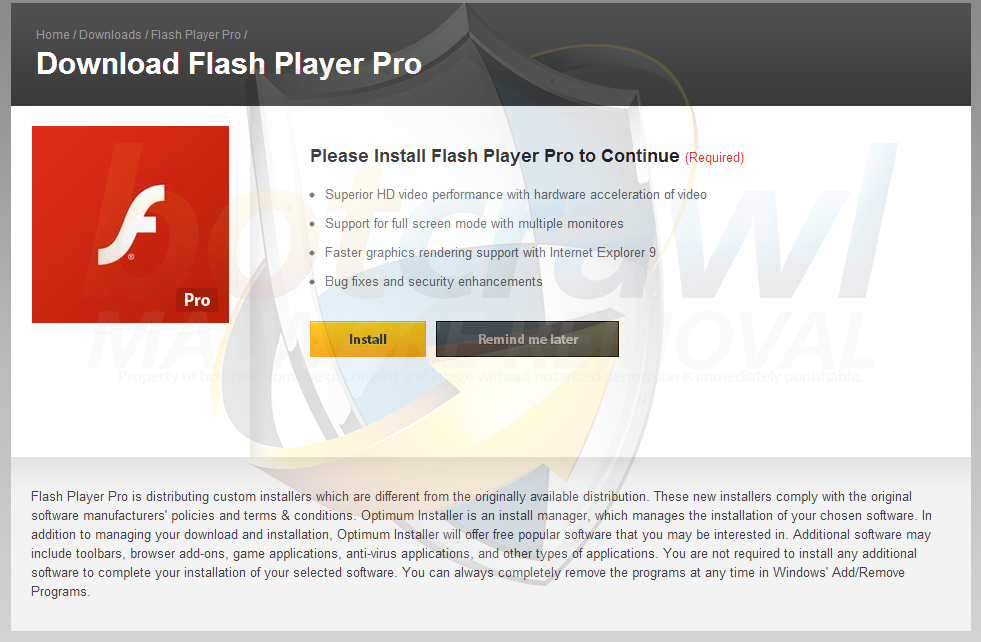
Now I don’t know about you, but I’m seeing an increase in malware — apps that do malicious things to your computer. And, distributors of malware are getting very creative using official logos and artwork, etc. to get people to download their garbage onto their computers. The most creative one that almost took me in looked like a Flash updater from Adobe, but it wasn’t…

Read the fine print!

It’s getting so you have to carefully read everything before you install it so if you’re responsible for your own computer, be very careful about how you update. Read the fine print and only download from the ‘official’ company site. Also, in the past I have been very reluctant to use security suites but I am currently a  Malwarebytes [their tech support helped me get rid of safesear.ch] and AVG Internet Security subscriber. It’s war out there — don’t be a casualty!

Another one bites the dust

Remember this one?

It’s great when it’s a Queen song but so great when it’s a free app you love like Trapster…

image001

How do you avoid this? First, be careful about what software you actually download and believe it or not, I believe you actually want to pay for software you rely on. You may think you’re getting away with something by using a lot of free apps but as they say about Facebook, if you’re not not sure where the revenue is coming from, it’s coming from selling your personal data. Do yourself a favor and look for apps that are freemium and actually pay developers for what you use. Not only is it the right thing to do, it will keep your favorite apps from disappearing…

Oh, and if you’re looking for a Trapster replacement, try Waze — seems to have a lot more momentum and it will actually save you time, not just report speed traps!

Osama wanted new name for al-Qaida to repair image

As a marketing manager, all my challenges pale by comparison…

Todd Lohenry's avatarBright, shiny objects!

And you think you’ve got branding challenges!

As Osama bin Laden watched his terrorist organization get picked apart, he lamented in his final writings that al-Qaida was suffering from a marketing problem. His group was killing too many Muslims and that was bad for business. The West was winning the public relations fight. All his old comrades were dead and he barely knew their replacements.

Faced with these challenges, bin Laden, who hated the United States and decried capitalism, considered a most American of business strategies. Like Blackwater, ValuJet and Philip Morris, perhaps what al-Qaida really needed was a fresh start under a new name.

The problem with the name al-Qaida, bin Laden wrote in a letter recovered from his compound in Pakistan, was that it lacked a religious element, something to convince Muslims worldwide that they are in a holy war with America.

Wow!

View original post

A better business presentation is…

Nicholas Bate shares 7 thoughts on better business presos. They…

  • Are shorter rather than longer.
  • Have slides as support rather than lead.
  • Talk about the audience and their challenges rather than the presenter and his/her magnificence.
  • Start and finish on time rather than assume nobody has any other place to be.
  • Meet the objective rather than fills the time.
  • Remember it is intended to achieve change rather than simply educate so insists on actions.
  • Better than the previous time it was given.

via A Better Business Presentation Is 7 – Nicholas Bate. Get his book Love Presenting Hate (Badly Used) Powerpoint here.

Start a Blog at WordPress.com.

Up ↑